Spread the Word

Site Feed


Powered by FeedBlitz

Subscribe with ...

  • Add this blog to my Technorati Favorites!
  • Subscribe in Bloglines
  • Subscribe in NewsGator Online
  • Subscribe in Rojo
  • Add Random 

Bytes (WebLens Blog) to Newsburst from CNET News.com
  • Add to Google
  • Add to My AOL
  • Subscribe in FeedLounge
  • Add to netvibes

Translate This Post

Burn a Feed

Ping the World

Showing posts with label RSS. Show all posts

Thursday, May 18, 2006

Tools for Taming Your Feeds

It seems to me that most of the Web 2.0 apps emerging every week are devoted to some aspect of retrieving and organizing Internet content. Every day, there are new tools for sharing favourites. Likewise, the ability of RSS to push relevant content to our desktops has led to a swarm of online applications for reading, organizing, and managing feeds.

Good thing too, because it doesn't take long to start feeling overwhelmed once you discover this potent automation tool. I'm struggling to keep up with the daily flood of posts provided by just nine feeds — and that's probably a fraction of the volume inundating the seriously feed-addicted. RSS has put us all at risk of information overload.

I have test-driven several of the feed readers linked from the sidebar at left below, but it was not until the recent discovery of two new tools that I began to feel that I might just be getting the chaos under control:

  • Pageflakes is a higly customizable web organizer that combines a feed aggregator and reader with several useful desktop tools. You can add as many new feeds as you wish, organizing them on separate tabs for ease of access. Accept the default setup, which includes an address book, to-do list, notepad, weather, local movies, and more, or customize your desktop by choosing from a huge list of applets. You can append everything from mini spreadsheets and calculators to custom searches. I LOVE this application so much it has become my new browser start page.
  • Netvibes is a virtually identical tool (I'm not sure which came first). Like Pageflakes, you can add new feeds, organize content and tools onto separate tabs, and customize the interface. It doesn't offer the selection that Pageflakes does, but it has one especially nice feature: you can color-code your different feeds for at-a-glance recognition. E.g. you could have all your web design feeds coded green, your pop culture feeds blue, and your mainstream media news stories orange.

I find both of these applications more intuitive and easier to use than the other feed readers listed here. Now, if I could just marry them, I'd be truly happy. For the time being, I'm using both of them to fend off the information deluge.

Friday, April 28, 2006

Stalled Email Feed Needs Manual Restart

Here's a heads-up. I noticed a huge drop in my feed stats last night. Bigger than could be explained by a few people unsubscribing, which of course happens constantly. People check out a feed for a few days, then decide it's not for them. I've seen those little daily quivers in my stats. This time, though, the number of subscribers plunged dramatically. On checking further, I noticed that FeedBlitz, the email feed service that I use, was not in the list.

When I logged into FeedBlitz to check, I learned that the feed was stalled. At some point in the last few days, the feed must have been down when FeedBlitz attempted to access it. What's worse — and here's what's important to know — you have to restart it manually from the FeedBlitz dashboard. It won't restart by itself!

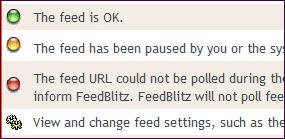
To reset it, click on manage your subscriptions. The feed name will appear beside a group of icons. A stalled feed will have a red icon beside it, rather than the usual green. You need to turn it green again, which you can do by clicking on the green check mark.

This little burp has got me wondering if the same thing can happen with the dozens of feed readers and aggregators that people are using to access this blog.

I guess, in the grand scheme of things, it's not a big deal, but it's a pain.

Thursday, April 06, 2006

Promote Your Feed With an Autodiscovery Link

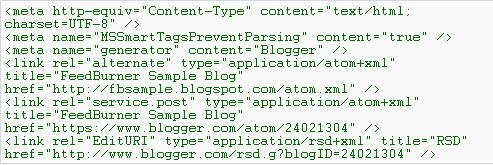
I learned recently that I wasn't taking full advantage of the power of this blog's RSS feed. Yes, I've burned a feed and scattered links to it throughout this blog, even in the header. But I wasn't taking advantage of a powerful feature in this blog's template: using the autodiscovery link to point to my RSS feed location. Inserted into your blog by the <$BlogMetaData$> tag, this bit of code tells news readers and web browsers the location of your feed address. By default, it points to Blogger's original Atom feed. This could result in people unwittingly signing up on the old feed and your feed stats being wildly inaccurate.

Since RSS is more popular than Atom, you may want to ensure that autodiscover points there. If you're a FeedBurner user, there's no need to worry about abandoning Atom users, since FeedBurner's SmartFeed service automatically translates your feed into a format compatible with any feed reader. Just be sure this feature is enabled in your FeedBurner Optimize options.

Tweaking the Autodiscover Tag

To make autodiscover point to your RSS feed, you need to modify the Blogger template. Here's how, courtesy of a post in the FeedBurner forums:

  1. Load your blog onscreen and view its source code (click View Source from your browser menu).
  2. In the header area at the top of the file, locate a block of code that looks similar to this:


  3. Copy the entire block of code (there could also be a couple of <style> and/or <script> tags following this that you may also want to include).
  4. Close the View Source window and open your blog template.
  5. Back up your template before proceeding further (open the Template tab, click inside the template area, press Control+A to select the entire document, and Control+C to copy; then switch to a text editor, press Control+V to paste the document, and Save).
  6. Locate the <$BlogMetaData$> tag near the top of the template and delete it.
  7. Replace it with the block of code you copied in step 3.
  8. Look for a line similar to the following in the code you just pasted:
    <link rel="alternate" type="application/atom+xml" title="Your Blog" href="http://yourblog.blogspot.com/atom.xml" />
  9. Change the URL in orange above to the address of your FeedBurner feed, as in:
    <link rel="alternate" type="application/atom+xml" title="Your Blog" href="http://feeds.feedburner.com/YOURFEEDNAME" />
  10. Save your changes and re-publish your blog.

    Note: to see the changes in View Source, you may first have to clear your browser's cache.

According to FeedBurner, this technique works whether your blog is hosted by Blogger or on your own server. For more information, please see:

I hope you found this tip useful. If you enjoy these posts, please support Random Bytes with a link from your blogroll. Sign up for our feed to ensure you don't miss future postings.

Wednesday, March 29, 2006

Feed Changes: What Do You Think?

OK. My massive army of feed subscribers. This one's for you ...

You've probably noticed a couple of changes in my feed in the last day or two. I have switched to short excerpts instead of repeating the entire post, on the theory that:

1) you will more quickly be able to locate posts that interest you;
2) your eyeballs will last longer and you will curse me less;
3) you'll be more inclined to click through and explore the site.

I have also used FeedBurner's FeedFlare feature (cool alliteration — say that three times fast) to add quick links to tagging and social bookmarking sites. These appear both in the feed and in each blog post.

Questions:

1) Are there too many subscription/tagging links?
2) Would you find these useful?
3) Do you prefer short excerpts or full-length posts in the feeds you subscribe to?

I'd really love some feedback on this, so please take a moment and drop a comment here. Thanks.

Wednesday, March 22, 2006

Blog Promotion: Push Posts Out With an RSS Feed

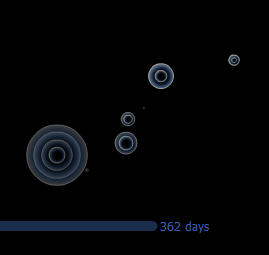
The graphic you see at left is a screenshot taken from an entertaining Flash visualization published by FeedBurner to illustrate the astounding increase in the number of RSS feeds registered with the company since 2004. FeedBurner is one of many companies that have emerged in recent years to create and manage RSS feeds. The company currently manages 227,000 text, audio and video feeds for 145,000 publishers — primarily news sites and blogs — with nearly 1,000 new feeds created every day. Click the screenshot to see a vivid demonstration of the phenomenal growth of this new technology.

What is RSS?

RSS stands for really simple syndication. RSS feeds are XML-formatted, machine-readable descriptions of your content that can be picked up and indexed by news and blog search engines like Technorati and feed readers and aggregators like BlogLines or NewsGator. Users then subscribe to receive updates automatically.

Like blogging, RSS is often associated with Web 2.0. The technology is still so new that, according to Yahoo, only 4% of Internet users have knowingly used it (although this figure is higher in the early adopter world of blogging).

Creating a feed gives readers the ability to receive your words of wisdom without having to lift a finger. But your feed becomes an especially potent blog marketing tool when combined with a ping service such as Ping-o-matic or Pingoat. These services let you literally summon the news readers and feed aggregators. Most are quick to respond; many come by and index your latest post within hours, if not minutes. Best of all, they automatically notify your subscribers that you have new material available.

Together, these technologies allow you to push content out proactively. This capability — more than anything else — distinguishes blogs from HTML-based mainstream sites in terms of marketing. Regular sites must wait passively for the search engines to come find them, and then fight to be noticed in the jumbled heap of (mostly) irrelevant search results.

Adding an RSS Feed to your Blog

Feeds come in two flavours: Atom and RSS, with RSS enjoying wider support. For some reason, Blogger / Blogspot opted to provide only an Atom feed. This isn't a big deal. You can create an RSS feed using FeedBurner or a similar service, or let FeedBurner's SmartFeed program automatically convert Blogger's Atom feed to RSS.

Once you have burned your feed, link to it so that interested users can sign up to receive posts automatically. Place this link somewhere prominent, such as in your blog header. Make it easy for people to subscribe by creating sign-up links to your feed specifically for their favourite news readers and aggregators, as I have done below. Link to FeedBlitz or a similar service so subscribers can opt to receive posts via email.

Bottom line: if you don't have an RSS feed, you are not leveraging the full power of the Web for promoting your blog. For RSS tutorials and more detailed background information, see:

This post is part of a series on blog promotion. If you found it useful, please consider linking to Random Bytes. Sign up for our feed to ensure you don't miss future posts.