


WebLens Updated
More changes at WebLens ...
Cayole Cruises added to the Travel Bargains page.
Lots of new developments at WebLens right now. We've been twittering up a storm, so we've just launched The WebLens Daily, a handy digest of relevant Twitter posts delivered to your desktop each and every day. Subscribe or follow us on Twitter to stay up to date with tweets relating to Internet and net search news, as well as web design, social media, and SEO and online marketing trends. Updated daily with fresh and timely content, and links to useful resources and interesting and entertaining sites. Drop by today and let us know what you think.
Announcing the brand new WebLens Toolbar. Keep all your favourite resources right at your fingertips, no matter what site you are viewing. Compatible with IE, Firefox, and Chrome, the WebLens Toolbar can be downloaded from any page on the site. It comes loaded with all the WebLens menu contents you've come to know and love, plus loads of extra goodies, like quick links to Facebook, Twitter, local weather, Amazon deals, Groupon, Flixster movies, Travelocity, TripAdvisor, Youtube, and more!
The WebLens Toolbar also includes a radio player and one particularly useful resource — Similar Sites, which displays thumbnails of sites similar to the one you are on. Best of all, the toolbar is fully customizable, with a marketplace of thousands more apps to choose among.
Get it today at our download page.
 SimplyHired.com's Job-a-Matic service allows any blog or web site owner to monetize a site with paid job listings. Target by industry and set your own pricing for listings you attract, and the company shares revenues with you 50/50. If your listings are on the skimpy side, Job-a-Matic "backfills" with relevant postings from SimplyHired.com's five million strong database of jobs. Click-throughs are rewarded with a 30/70% revenue split. You can target jobs by keyword or geographically, or both. (One down side — the service is currently limited to the U.S. only.)
Job-a-Matic generates a customizable listings page and lets you create widgets and ads that you can paste into your blog or site, as I have done at left below. The backfilled listings served by Job-a-Matic are attractive and easy to read, with some useful enhancements such as the ability to quickly and easily access geographically relevant salary information. Any listings you attract are added to the database, and promoted through SimplyHired.com's extensive network, which includes MySpace and LinkedIn.
The service debuted in February of this year, and already over 600 blogs have signed on. SimplyHired claims to be the world's largest job search engine and was lauded as one of the 50 Coolest Web Sites by Time magazine.
 After updating all 135+ of this blog's posts yesterday with the new Blogger's much-hyped "label" feature, I discovered, much to my annoyance, that Blogger's native feed now defaults to updated rather than published order — that is, feed contents are sorted by the date on which posts are modified not by when they were created!
For New Blogger users, unfortunately, this means that every time you make the slightest change to a post, including fixing a typo or correcting a broken link, it will jump to the top of your feed — regardless of how old or obsolete it is. If you do a batch of changes as I did yesterday, your feed will be a jumbled mess of outdated posts. If you subscribe to other people's Blogger feeds, you'll be seeing lots of recycled posts.
When I emailed FeedBurner about this, they informed me they can do nothing about how Blogger sequences posts. FeedBurner just grabs the original Blogger feed and reflects what's already there.
The fix lies primarily with Blogger, and involves a code tweak to your template. A quick Google search unearths lots of advice. The article that I found most helpful is this one from Kato Katonian, though I still had to comment out a couple of other lines in my template's header before his solution would work. Essentially, you need to change the feed reference in your blog's metadata to point to http://yourblogname.blogspot.com/feeds/posts/default?orderby=published.
Once I made this change to my template, my native Blogger feed (Atom format) started working correctly, but FeedBurner (the more popular RSS format) still wouldn't pick up the new date sequence. That proved easy to fix, with a quick visit to FeedBurner to update the native feed address. (Click Edit Feed Details and paste the corrected address.)
Other proposed solutions include an inventive gizmo from a Yahoo-owned Web 2.0 feed aggregator named Pipes. This tool lets you bring in any feed and output it in corrected date order, among many other things. It may help with correcting other screwed up Blogger feeds, though using it to fix your own feed would require current subscribers to re-subscribe.
If you have found other fixes, please drop a comment here.
 A while back, I blogged about CSS transparency techniques, describing two methods for incorporating transparent elements into your design. You can also introduce transparency by using PNG format images. Unlike GIF images, which are either "on" or "off" in terms of opacity, PNG images support full alpha transparency. This means each pixel can display a subtle range of tones from 0 to 255.
There are many ways to create transparent PNG images. If all you need is a plain transparent block to use as a background, check out Stian Grytøyr's handy transparent PNG generator. This useful tool allows you to select a colour by clicking on a color wheel. The tool creates a set of samples ranging from 0% to 100% transparency, in three versions of the selected colour (web-safe, "web-smart," and unsafe).
Lighten or darken the sample by clicking on the saturation/lightness patch to the right of the colour wheel. When you have the desired shade, click through on one of the percentage samples to see it used with some demo text against a busy background. From here, you can adjust the image dimensions, transparency, and colour. Right-click on the final rendered sample to save the image to your hard drive.
Note: The PNG graphical format enjoys strong support among compliant browsers such as Firefox, Opera, Safari and IE version 7. If, however, you view Grytøyr's page in IE 6 or lower, you will not see the transparency effect, as earlier versions of IE do not support full alpha transparency. For details, and a workaround, see A List Apart's article, Cross-Browser Variable Opacity with PNG: A Real Solution.
Random Bytes has had a facelift. For those who have been here before, the new look may be a bit of a surprise. If you popped by yesterday afternoon, my apologies. This blog's look and feel was evolving minute by minute, as I experimented with colours and backgrounds.
I think I've got something I like now, though, so it shouldn't change too much more. I felt it was time for a fresh look, especially since the old look and feel has been propagated through the blogosphere with the growing popularity of my three-column template.
For the new design, I wanted to focus on simplicity and readability. The first priority was eliminating the background mouse graphic, which had cluttered up the design and drawn some negative feedback for slowing page loads.
The repeat attribute controls tiling, telling Blogger to replicate the graphic both horizontally and vertically, as I have done in the main background here. To repeat only horizontally, as in this blog's post headings, change the repeat attribute to repeat-x. (For vertical repeats, it would be repeat-y.)
In this blog, I could have placed a background gradient or texture behind the entire sidebar, but I wanted to use them to emphasize certain sidebar contents. To do this:
For more on adding backgrounds to your blog, see this earlier post. Hope this information helps, and let me know what you think of the new design.
I have blogged a couple of times recently about ways to create 3-column templates. These posts have provided free templates for you to grab and customize, both for blogs and for regular web sites.
If you don't care for my designs, or if customizing them is beyond your comfort zone, you might want to try Firda Beka's Firdamatic tableless layout generator. This easy-to-use tool gives you a choice of two or three columns along with several customization options.
Best of all, you can use the code generated by Firdamatic for a regular web site, or click through to XML versions of the code for blogs. She has one for Blogger / Blogspot users and another for Moveable Type. A great resource. Thanks Firda.
(FYI: If you don't see two side-by-side columns on Firda's site, resize your window: she's got a vanishing float thing happening at certain window sizes.)
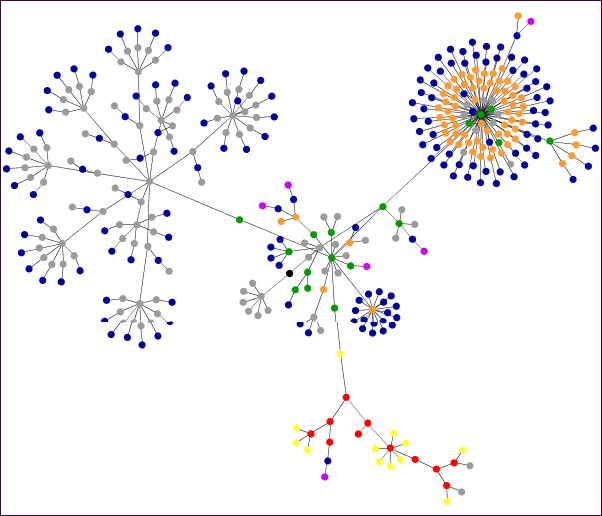 ProBlogger's Darren Rowse has a post this week about an entertaining little Java applet that graphs the HTML entities that comprise your web site. Websites as Graphs generates a swarm of colourful — and strangely mesmerizing — dots that coalesce into interesting patterns representing your site's structure.
Rowse used it to illustrate his post with several graphs that plot competing sites, including Google versus Yahoo and Engadget versus Gizmodo.
Already, a community is growing around this tool. Check out the graphs that people have posted at Flickr.
I was curious to see how it would treat WebLens. You see the result here. Give it a try for yourself. Just type any URL (web address) into the screen form and watch the fun begin. (Tip: scroll down the results screen for an explanation of the colors used.)
 It seems to me that most of the Web 2.0 apps emerging every week are devoted to some aspect of retrieving and organizing Internet content. Every day, there are new tools for sharing favourites. Likewise, the ability of RSS to push relevant content to our desktops has led to a swarm of online applications for reading, organizing, and managing feeds.
Good thing too, because it doesn't take long to start feeling overwhelmed once you discover this potent automation tool. I'm struggling to keep up with the daily flood of posts provided by just nine feeds — and that's probably a fraction of the volume inundating the seriously feed-addicted. RSS has put us all at risk of information overload.
I have test-driven several of the feed readers linked from the sidebar at left below, but it was not until the recent discovery of two new tools that I began to feel that I might just be getting the chaos under control:
I find both of these applications more intuitive and easier to use than the other feed readers listed here. Now, if I could just marry them, I'd be truly happy. For the time being, I'm using both of them to fend off the information deluge.
I've been having too many heart-pounding moments lately, courtesy of Blogger, which lost yesterday's post twice. This happened first in the middle of saving, and then — after painstakingly rebuilding the whole thing — Blogger trashed it again upon attempting to publish. On investigation, I learned that I'm not alone in my frustration; Blogger routinely not only loses/fries posts, but has been known to wipe out entire blogs, according to this post. Fortunately, my research led to several ways to back up, not just Blogger blogs, but those of Wordpress, Typepad, and Moveable Type as well:
Note: In the course of rummaging around for blog backup solutions, I also stumbled across w.Bloggar, a freeware tool for composing blog posts offline. This would have prevented the problems I had yesterday with Blogger losing posts upon saving and/or posting. I have tried composing in WordPad and pasting into Blogger's editing window, but that's not an entirely satisfactory solution. I have downloaded w.Bloggar to experiment with, and I'll let you know how it works out. In the meantime, Digital Inspiration has nothing but good things to say about w.Bloggar.

Regular readers of this blog will know that I'm a great fan of gadgets. I stumbled across another one a few days ago. The Glassy Button Generator will be of interest to web designers who are in a hurry and those who are aesthetically challenged. Just plug in a few variables, such as foreground and background colours, button dimensions, typeface, font size, etc., and this useful tool will crank out a round-edged glassy looking button for you to grab and save. It even creates rollovers.
I got this great find at The Generator Blog, another bookmark topper. This blog provides daily links to sites that generate all kinds of things from utter nonsense like the Silly Walk Generator, the Bush Speech Generator, and the Graffiti Generator I used to create the illustration for this post. These silly examples are utter time-wasters, but the Generator Blog links to dozens of useful resources too, like the Random Texture Generator and DiscoverySchool's Worksheet Generator.
The Generator Blog is a guaranteed time-gobbler. Check it out. And if you like these suggestions, please consider blogrolling Random Bytes.
I love stumbling across useful online tools and gadgets, especially those that make web design chores easier and more enjoyable. Earlier, I blogged about a useful tool for generating intermediate shades of colour.
Staying on this theme, here's one of the sweetest little color generators I have ever seen. Petr Staníček's site, WellStyled.com, contains a Color Scheme Generator that lets you creates color schemes with a single click of the mouse. Click on one of the color swatches arrayed around the onscreen color wheel and this nifty tool will create a four-colour scheme for you.
This is one of the most elegant applications I have seen. Additional features let you select among five types of colour schemes; choose a web-safe palette, if desired; vary the degree of opacity (he uses the term pastel); even view your colour scheme as persons with various types of color vision impairment might see it.
Available color schemes include monochromatic (various tones of the same hue), complementary (two colors diametrically opposite on the colour wheel), analagous (adjacent colours), triads (three equidistant colours), and tetrads (four equidistant colours).
Truly worthy of your favourites list, (though professionals should note that the model used is closer to classic subtractive (pigments-based) color theory than additive (light-based), and that the RGB conversions are approximate).
Another, similar but less full-featured tool recommended by a reader of this blog is Color Schemer Online. It, too, allows you to click on colour swatches and to lighten and darken schemes.
Have a favorite color tool? Let me know about it via comment. And if you enjoy these posts, please support the site by linking to Random Bytes. Sign up for our feed to be sure not to miss anything.
I wrote yesterday about three free online poll creation tools you can use to add interactivity to your blog. I had created and posted sample polls using all three tools in the left-hand sidebar of this blog, so you could experiment and compare results.
I have since taken down the samples because one of them was causing huge delays in downloading. I have no idea which of the three was the culprit, but it was really messing with download speed and overall site performance. Strange, because it wasn't happening yesterday. Maybe three is just overkill.
Another issue I was unaware of yesterday: One of these tools (BraveNet) scatters pop-ups all over the screen. I didn't realize this when I posted yesterday since I usually work with pop-ups blocked.
Lesson learned: it's always a good idea to test any tools you embed in a web site, with pop-ups enabled, to make sure they aren't spewing unwanted garbage all over the screens of your visitors! This will, unfortunately, reflect poorly not on the source of the pop-ups but on you.
So, to anyone I've annoyed with obnoxious advertising , my apologies :-)
In poking around Darren Rowse's list of tips for promoting your blog, I came across a post talking about ways to add interactivity. Among the tools and resources Darren has rounded up are links to a couple of online polling tools.
Curious, I tried out both of the tools Darren describes. Both services generate a small piece of Javascript that you paste into your template. Both are highly customizable; both collect data in real-time; both present results graphically; and both allow you to prevent multiple votes.
Personally, I really like the service offered by BlogPoll. The code is generated on the fly and is easy to customize, with a nice onscreen preview feature. About the only downside, for me, is the rather unpleasant advertising in the results screen. I guess that's the price of free.
The service offered by BraveNet is more comprehensive and considerably more difficult to set up and customize. On the plus side, it allows you to create and store multiple polls and even to set up timed rotations among them. The user interface is not as intuitive as BlogPoll's, but they don't bombard you with tacky advertisements.
There are many other companies offering online polling utilities. One worth a look is WebSurveyor. It too is free and easy to customize, and it also offers the ability to store and rotate multiple polls.
Sample polls created using these three tools are displayed (temporarily) in the sidebar to the left for comparison purposes. Feel free to try them out; click View Results to see how each formats and presents responses.
I shop online a lot, and much of the time I end up extremely frustrated. But I just had an unusually pleasant experience with an online purchase that I just have to share here.
VisiBone offers a variety of useful web design tools, including HTML, CSS, and colour reference cards and posters. I just ordered their Browser Book, half expecting the same teeth-grinding experience as usual with online purchases. What a surprise! Their shopping cart works like a charm: no burps or hiccups; no confusing instructions; no looping me back again to the beginning or jumping me out of the site; no request to fill out a field that didn't exist; best of all, no snippy Sorry, we don't ship to Canada at the tail end of the process.
The whole thing took about 30 seconds, moving me smoothly through each stage, from address confirmation to the hand-off to PayPal (they accept credit cards too), and back again for final confirmation. I actually found myself thinking this is what online shopping should always be like!
Their products aren't half bad either. Take a look.
After much experimentation, I have finally found a traffic statistics tool that works as advertised. In the last week, I have been busy subscribing this blog to just about every directory, blog portal, and link exchange I could find.
In the process, I have tried several counters and stats tools, but none left me jumping for joy. Most were unwieldy and non-intuitive. A couple were just plain useless. One simply wouldn't accept my login and password, despite tech support intervention.
Just when I was beginning to despair of finding a good, reliable counter that is easy to use and produces statistical reports that make sense, I stumbled across StatCounter. This cool little utility took seconds to configure and get running. The site is fast, easy to navigate, and well documented with comprehensive help available if needed.
The blogging world's most popular stats program seems to be Site Meter, and I have set up that one as well, for comparison purposes and because The Truth Laid Bear ecotraffic blog ranking relies on this tool.
I'll be posting both of these to WebLens' blogging resources. If you have any you'd recommend, please let me know through the comment feature of this post.
In an earlier post, I talked about a couple of great sites for finding and/or generating the small 80x15 web badges like the one you see at the top of this post. I had stumbled across these two sites in the course of researching the topic, but efforts to find similar sites were not very fruitful. Then yesterday, I hit the motherlode. Not surprisingly, once again, Lorelle Van Fossen has already covered this topic in depth. Her comprehensive list of badge generators is at her blog, Lorelle on WordPress, along with more badge, button, and icon generators. Lorelle's blog is an absolute treasure trove of goodies, and well worth taking time to explore for anyone interested in web design or blogging.
I don't know about you, but I love stumbling across cool gadgets, especially when they're free! My folder of handy online tools, scripts, and code generators continues to swell every day. Topping the list is a truly useful tool I stumbled across a few days ago. Eric Meyer's Colour Blender generates a series of intermediate shades from two colours that you specify. This is a great resource for creating web palettes (or any type of color scheme) on the fly!
Choose hex or RGB, select your start colours from a point-and-click color picker, and set the number of midpoints, then simply click Blend, and the picker will generate the code for you. Technology Lighthouse's ColorCache product does the same thing, and much more, for a modest fee of $35 USD.
Note: Meyer is a CSS maven and author of numerous books
on cascading stylesheets. His web site is also a fountain of information on this topic.


