Spread the Word

Site Feed


Powered by FeedBlitz

Subscribe with ...

  • Add this blog to my Technorati Favorites!
  • Subscribe in Bloglines
  • Subscribe in NewsGator Online
  • Subscribe in Rojo
  • Add Random 

Bytes (WebLens Blog) to Newsburst from CNET News.com
  • Add to Google
  • Add to My AOL
  • Subscribe in FeedLounge
  • Add to netvibes

Translate This Post

Burn a Feed

Ping the World

Showing posts with label Photography and Photoshop. Show all posts

Sunday, May 15, 2011

Fractallicious Art Now at RedBubble


After a long absence teaching English overseas, I'm back creating fractal art and I've found a promising new venue for selling my work online.

I have sold my work through microstock sites, and still license it (for commercial use) through Fractallicious, but I have never found a satisfactory print on demand solution. After a disappointing experience with CafePress (standing out in the hordes of mediocre merchandise was a challenge), I was a little gun-shy about print on demand, but I thought I'd give RedBubble a try nevertheless.

I am extremely impressed by the quality and originality of the art and photography to be found at this site. It is much more oriented to serious artists than sites like CafePress and Zazzle. The site is easy to use, for both buyers and sellers. It's a snap to upload your work and create a listing, and the site offers various widgets for cross-promotion through Facebook and Twitter, etc. Artwork can be printed on a variety of product types, from fine art to t-shirts. You set a base price, and they handle printing and fulfillment.

I have just finished setting up a store at RedBubble, where you can buy my fractal art printed on a variety of products, from fine art prints to greeting cards, t-shirts, and stickers. Among the products available are several rainbow images that are great for Pride fund-raising and gay and lesbian events.

Whether you're an artist looking to sell, or someone seeking a distinctive fine art print, drop by and have a look.

Thursday, June 28, 2007

New Corbis Microstock Debuts

The beta version of SnapVillage — Corbis' long-awaited foray into the microstock arena — debuted a few days ago. I've done quite well online with some of the other microstock sites, so I was curious about how the traditional stock photography giant might approach the business of microstock. They had, after all, been slow to acknowledge the seriousness of the mounting competition coming from this quarter.

So far, I'm colossally unimpressed. I uploaded half a dozen images over a week ago, and as of this writing they still aren't processed. No acknowledgment at all.

Worse, the site times out quickly after the upload completes, so that if you do not immediately enter descriptions and keywords (that's right, the site doesn't support embedded IPTC information), you're bounced out, and you have to RE-LOAD everything all over again.

I was not impressed with the lack of support for IPTC data, which is pretty standard in the industry, as is the ability to upload via FTP. The site is still in beta, so one can only hope these features will be coming shortly. If they don't, SnapVillage will fail to attract professional photographers who have come to rely on such functionality at other microstock sites.

The quality of the existing images is poor, but then — in fairness — I guess Corbis faces a bit of a branding dilemma. They need to somehow differentiate this site from their costly "high-end" site. Unfortunately for them, some of the other microstocks have really raised the bar. Sites like Shutterstock, iStockPhoto, and DreamsTime feature excellent photographers and many professional quality images.

Corbis is late off the mark, and disdain virtually oozes from this site. It's evident in the name they chose — snapvillage — the word "snap" more than a little denigrating in its suggestion of casual snapshots rather than serious photography. It's almost as if they're targetting the Flickr amateur shutterbug crowd. Indeed, some of the images look like they came straight from the worst of Flickr.

All in all a failing score. One would expect more from a company backed by the Corbis brand and bankrolled by Bill Gates.

Wednesday, November 29, 2006

Photo Duck Funnies Right On

Saw a link yesterday in the Shutterstock discussion forums to a clever online comic strip about the trials and tribulations of daring to earn a living as a photographer. What the Duck is shutterbug Aaron Johnson's wry take on all things photographic. Johnson lets his readers name each strip through his blog's comments feature, and just reading the comments on some of the strips can be pretty entertaining. Check it out. Some of the strips are hilarious.

Monday, November 13, 2006

Output Your Designs on Merchandise

I mentioned a while ago that I was trying out some microstock photography sites as a sales venue for my fractal art images. I have been looking for novel ways to give these images as gifts, especially with the holiday season coming up. My Canon i9900 colour inkjet printer does a surprisingly good job of printing my fractals for use as greeting cards or as framed prints, but I've been looking for something a little more out of the ordinary. A couple weeks ago, I found the solution.

CafePress.com allows you to upload your own designs for output on a wide variety of merchandise. From sheatshirts, caps, and t-shirts to mugs, mousepads, buttons, and more, there is no upfront cost to customize an item whether for your own use, as a gift, or to sell. This solution is ideal for artists, designers, or photographers who want to showcase their work or supplement their income. And it's a useful low-cost alternative for small organizations that don't have huge budgets for logowear.

The site allows you to set up a free online store and set your own pricing over a baseline figure that they establish. They print your designs on demand and handle order fulfillment, payment processing, shipping, and customer service. The free shop service does place limitations on the number of products you can customize (basically one of each item), but for only $6.95 per month (less for longer terms), you can upgrade to their premium shop option, which imposes no such limitations. I'm trying out the premium shop service for three months, with a store that I have called Fractalicious. If you like any of my designs, I'd be grateful for your support.

Even if you don't have a creative bone in your body, you may still want to check out some of the other shops at CafePress. From politics to the environment, from pets to popular culture, you're likely to find something among their extenstive inventory for even the most hard to please person on your list.

Wednesday, October 04, 2006

Microstocks Shake Up the Stock Photography Market

Royalty Free Images For some time now, I have been selling photos and artwork online through a new brand of stock photography site that is shaking up this highly traditional marketplace.

At sites like Corbis and Getty — which have long dominated the industry — professional photographers sell their work for payments ranging into the hundreds of dollars per image.
Now, an emerging army of micropayment stock photography sites is creating serious competition for the traditionals. Still a relatively new phenomenon, the microstocks allow people to buy images on a subscription or pay per download basis, for as little as 25¢ each. You make up the difference on volume, at least in theory.

There are dozens of microstocks, with new players emerging every day. I have been experimenting with some of them for several months now. Here's what I've found:

  • DreamsTime: Sales are sluggish, though this site pays the best of the few I have played with, at up to $10 per image. Purchase available on a subscription or pay per download basis. Slow approval response time (5-10 days). Moderate rejection rate (18%), for sometimes arbitrary reasons. They have rejected two images that are best sellers on other sites.
  • Shutterstock: This site is my favourite, hands-down, even though they only pay 25 cents per download. Due to the volume of downloads, however, I have earned almost ten times the income generated by the other micros I use. For some reason I cannot fathom, my images sell like hotcakes here. SS turns around approvals speedily and, so far, I have enjoyed a 100% acceptance rate! The one time they rejected an image, it was accepted after I fixed the problem and resubmitted. Shutterstock works on a subscription basis only, which may be the key to their success.
  • Fotolia: A new player, originating in France, this site caters to Europe and North America. Pricing ranges from $1 to $3. Approvals are fairly quick and rejections minimal (5%) though, like DreamsTime, they sometimes reject images for seemingly arbitrary reasons. Sales through this site, which are on a pay per download basis, have been slow.
  • iStockPhoto: The grand-daddy of them all, this site is also the most picky and demanding in my experience. In fact, I gave up shortly after submitting my first batch of images. iStock rejected every single image, either as not suitable for their audience or due to defects that the other micros didn't see. iStock pricing ranges from $1 to $5, on a per download basis.
  • 123RoyaltyFree: 100% acceptance rate, but abyssmal response time and only one sale so far. It takes weeks for uploaded images to be reviewed and OK'd at this site. I have stopped uploading, but maybe it will work for you. 123RF is well spoken of in some of the microstock discussion groups. Pricing works on a subscription or pay per download basis, the latter at $1.20 per image.

Though many professional photographers deplore the microstocks, debate in some of the online microstock discussion groups tends to suggest that some pros are experimenting with this new marketplace. More than a few people predict that the new market economics — why pay hundreds of dollars when you can get just as good an image for $1.00? — will spell the end of the traditionals. I wouldn't be surprised to see the big players launch their own microstock brands within the year.

For me personally, the microstocks have not been a fast track to wealth and fame, but they have generated a nice little income supplement. Be warned, though: you need a fairly high volume of images accepted to see any real return. Keywording is tedious, but vitally important. Get a good FTP utility, and save time by storing descriptions and keywords within images (look for tools that support EXIF/IPTC data retrieval); these fields will then populate automatically when you upload.

For a good introduction to microstock photography sites, see Stephen Finn's excellent guide. For more microstock and traditional stock photography resources, see the WebLens image search page.

Tuesday, September 05, 2006

Intensifying Images With Photoshop Vivid Fog Effect

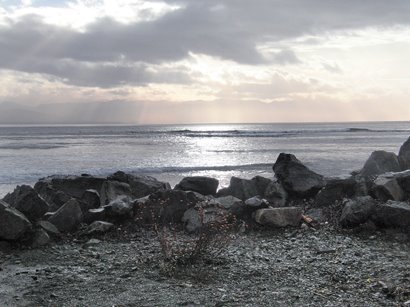
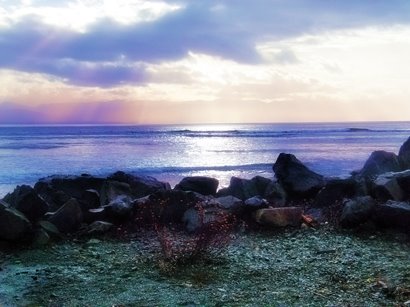
Hi folks. Sorry for the lapse in postings. I actually managed to get a break from the computer to enjoy some sunshine in these waning days of summer. Back full force now, though, with a great tip from James, a friend and fellow Photoshop junkie. Vivid fog is an easy three-step effect (which you can turn into a Photoshop action) that adds drama to ordinary images, and can also be used to create striking silhouettes of foreground objects.

To use this effect:

  1. Start with a quality image with good foreground/background delineation and subtle colour. Low light levels and the presence of an obvious foreground object or figure add more drama.
  2. Open the image in Photoshop and copy the background to new layer.
  3. Bump up the saturation of the new layer (to the maximum for the most drama).
  4. Apply a Gaussian blur to the new layer (10 pixels seems to work well, for 300 dpi images).
  5. Change the new layer's blend mode to Soft Light.
  6. Save your work in the appropriate file format.

Viola! James suggests you make these changes right on the background copy rather than applying adjustment layers. He also uses an "S" curve to heighten contrast, or a Levels adjustment to increase colour, such as the red in a sunset. He suggests making these adjustments before the saturation and blur steps.

You can see before and after examples at the top of this article. As you can see, the colour in the original image was quite subtle before applying the vivid fog effect. At right is a third version, with the foreground masked to reduce the sense of underexposure created by this process.

Hope you find some interesting uses for this. Enjoy!

Thursday, August 03, 2006

Tips for Photoshop Memory Management

I feel like I've won the lottery! My laptop computer is the happy recipient of 1.5 GB of additional memory, bringing the total RAM available from 512 MB to 2 GB. I resorted to this move (reluctantly, and at considerable expense) after tiring of sluggish performance, overheating, and frequent crashing when using Photoshop and other memory-intensive applications. The hard drive churned like a demon constantly as Photoshop paged out what it couldn't handle in memory to the swap file. It was even worse with fractals. The screen refresh rate was slow and it took many hours to render complex images to disk because of limited memory.

The additional RAM has turned my humble little laptop into a powerhouse, virtually solving all my Photoshop performance issues overnight. If you are experiencing similar problems and you don't have the luxury of adding 2 GB of RAM, there are some things you can do to boost Photoshop's memory handling. For a good discussion of this topic, see the MacWorld article, Optimizing Photoshop CS2.

The tips provided in this article improved the situation considerably in the lengthy interim before I finally bit the bullet and sprang for more RAM. Among the things I learned was that I had been allocating too much memory to Photoshop. This caused long delays — and even crashing — when saving, as Windows and CS2 duked it out for the tiny amount of available RAM.

Tuesday, July 04, 2006

How to Create Amazing Circles and Bubbles

For photographers and Photoshop buffs, one of the biggest dangers of Flickr is its addictiveness. Since I first signed up a couple of months ago, I have spent endless hours posting my own images, exploring other people's work, and discovering all kinds of wonderful tools, tips, and tutorials. My latest Photoshop experiments have taken me into the realm of making amazing circles and phubbles.

Making an Amazing Circle

You can see my first attempt at an amazing circle at left above. I first noticed these dazzling spheres posted on various groups in Flickr, and a couple of quick queries led to tutorials on how to make them.

Amazing circles are not hard to make — the main challenge lies in choosing the right image. They are created with Photoshop's Polar Coordinates Distortion filter. BrilliantDays.com has published a short tutorial that walks you through the process.

Making Phubbles

Once you've mastered amazing circles, it's a good bet you'll want to refine the result to produce a transparent bubble effect. Phubbles, or Photoshop soap bubbles, are made from amazing circles that have been successively erased from the center out, to reveal just the right amount of image detail beneath. Flickr member Photopool describes the process in his popular tutorial. I followed his instructions to achieve the result you see at right.

For more examples, see Flickr's Amazing Circles interest group.

Tuesday, May 16, 2006

Using Photoshop's Wave Distortion Filter to Create Abstract Art

When I review my shots after a photography outing, I inevitably end up using Photoshop to make minor image corrections: using the curves tool to change the light and dark points, blurring backgrounds, sharpening a bit here and there, perhaps adjusting colour balance. But I rarely play around with Photoshop's other filters — partly, I guess, because I'm a bit of a purist, but mostly because time is always at a premium around here. I make an exception, though, for the distortion filters. The wave filter, in particular, can produce dramatic results.

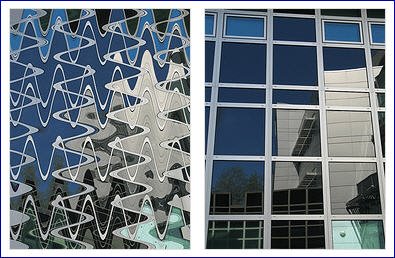
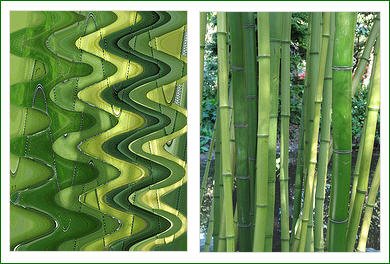
Even mediocre photographs can be transformed into outstanding art pieces after being run through this filter. Any image with prominent horizontal and/or vertical elements and strong saturated colour is a good candidate for this treatment, which provides substantial control over the wave effect. The filter dialog box allows you to set the number of wave generators and specify wavelength, amplitude, and scale. (I'm not sure what scale does, but varying the setting creates interesting effects.)

I have included a couple of before and after examples to show you the results produced by this filter. The bold lines and strong colour of the image at top left made this architectural shot a good wave distortion candidate. The image of a stand of bamboo was uninspiring on its own. Running it through the wave filter transformed it into a colourful swirl of undulating pools and eddies. Two previously photo-realistic images have become delightful works of abstract art, and I am hooked.

I have created a Flickr account so you can see larger versions of both the originals and the distorted results.

Friday, April 14, 2006

Stumbling Onto Web Treasure

Wow. Am I tired. I stumbled onto StumbleUpon last night, staggering bleary-eyed into bed at 2:00 a.m. Even then, I could barely tear myself away from the computer (not a good sign). Actually, I've been aware of this site for a while as I have noticed traffic originating there in my stats. Last night, I decided to take the time to explore it. My surfing habits will never be the same again, thanks to this Web 2.0 service.

Like Digg, del.icio.us, and many others, StumbleUpon is a social bookmarking tool that allows users to tag and rate recommended sites and build community around themes. It offers a huge selection of categories, which you can explore from a toolbar. The system learns your preferences quickly, and you are presented with a limitless selection of quality sites on any subject that interests you.

Unlike typical traffic exchanges, there's no timer, no advertising or spam sites, and no junk. The stumbled upon sites are fun and innovative, with good spam control and no annoying pop-ups. I made the mistake of exploring the photography category, and spent several hours stumbling through some exquisite eye candy. Here are just two of the many gems I discovered:

Stay tuned for more great photographic finds and other social bookmarking tools. And if you enjoyed this post, sign up for our feed for more on this topic.

Thursday, February 02, 2006

Eric Myer's Digital Photo Sleight of Hand

Being a bit of a shutterbug myself, I love surfing photography sites. Here's one that I have been meaning to share with you for a while now.

Eric Myer — not the Eric Meyer of CSS fame — offers a playful little amusement called Stereotypes. Done with Javascript, this innovative game lets you produce composite portraits that result in some truly bizarre-looking individuals. You can even generate a slide show that will combine faces randomly. The strange thing is these digital chimeras look oddly real, like the sort of people you'd expect to encounter at a carnival or lolling about downtown Las Vegas.

Check out Myer's portfolio too. He seems to specialize in portraits, even in his corporate and advertising work. He likes to position his subjects in odd ways or against gaudy backgrounds. The result is captivating. A must-see for anyone interested in portrait work.

Wednesday, January 25, 2006

More Flickr Magic from KrazyDad

After finding the cool Spell with Flickr entertainment that I blogged about yesterday, I went digging for other things you can do with this popular tool besides simply posting photographs.

Happily, I stumbled across KrazyDad, a compendium of delightful and innovative entertainments brought to you by Jim Bumgardner, author of Flickr Hacks and programmer par excellence.

Jim has devised a number of must-see games, puzzles, and other diversions that you can interact with. Topping the list, for me, are his amazing Flickr innovations, which have to be seen to be believed. Check out Phyllotaxy, and then give Flickr Color Pickr a spin.

KrazyDad also offers a selection of exquisite kaleidoscopic screensavers and the Metascope screensaver maker. This utility scans the web for images on themes you specify and creates a kaleidoscopic screensaver from them. I haven't tried this tool yet, but it's certainly on my growing to-do list, especially as it gets a big thumbs-up from Tara Calishain, author of Google Hacks.

Jim's Springy Thingies is also fun, as is his Spyrographer. Check it out.

Monday, January 23, 2006

Personalize Your Site with a Flickr Photo Title!

I don't have a category for "web silliness" but I probably should, because I seem to stumble across web diversions that range from amusing to downright silly with surprising regularity. I actually have a burgeoning folder of silly sites. The most recent addition merits a mention here, in recognition of its entertainment potential, if not its outright innovation.

Actually, you may find an application in your blog or web site for Erik Kastner's Spell With Flickr, a sweet little script that spells out whatever word or phrase you specify in randomly-generated Flickr alphabetic photographs. (Flickr is, of course, the blogosphere's most popular photo-sharing site.)

Click your browser's Refresh button and your letters will continually update. Kastner even provides the source code, should you want to integrate this utility into your site.

Amazing the things people do with their spare time.

Friday, January 20, 2006

Portrait of an Era Compelling Tribute to the Sixties

I saw the Linda McCartney Portrait of an Era photography exhibit yesterday, and was assailed by mixed emotions: stirred by vivid recollections of coming of age in the 60s; struck by the strength and power, intimacy and vulnerability MCartney captured on film; and saddened by the lengthening passage of time, not to mention growing awareness of my own mortality.

It was a shock to learn that baby Mary, one of the offspring of the union between Paul and Linda, is now almost 40. The photo of her as an infant nestled, sleeping, in her father's lap could have been taken yesterday. That's the "mirror shock" we boomers are increasingly said to be experiencing, and I underwent a healthy dose of it yesterday.

How much of this was because McCartney was a brilliant photographer, and how much was due to an uncomfortable confrontation with the very icons of my youth, I can't say. Opinions about McCartney vary, and not all are kind. To some, she was a gifted artist who captured the very essence of 60s rock and created a lasting visual record of the greatest musicians of our age.

Others dismiss her as "just a groupie" who was in the right place at the right time, lucky enough to meet some legendary performers and capture history in the making. Anyone could have taken those photos, these people will tell you.

I don't agree. The job of photography is not only to chronicle events and eras, but to challenge viewers to stop, think, and feel. McCartney's photographs create a unique sense of time and place and stir a bittersweet nostalgia. These are images so familiar they form a part of our collective psyche. John. Paul. George. Ringo. The Cream. Jim Morrison. Janis belting out a song. Jimi caught mid-guitar flail, arm extended dramatically, as if pointing to the watch tower. David Crosby dreamy and stoned. Grace Slick, tough as nails, bottle of bourbon nearby.

Most are dead now. Viewing McCartney's pictures, I was struck by an overwhelming sense of poignancy, of sadness at all the talent wasted, all the songs that would never be. That was the era of Haight-Ashbury. Of hippies and flower power and psychedelic posters. Of sex and drugs and rock and roll. McCartney sailed through it all, intact, until breast cancer felled her in 1998. Her legacy lives on in these wonderful images.

The exhibit is on at the Royal BC Museum until January 31st. Don't miss it.

Friday, January 13, 2006

Nikon Goes 100% Digital

Here's a telling portent for the future. Venerable camera manufacturer Nikon announced today that it will stop producing film cameras and focus solely on the digital market. That's a decision with some pretty profound implications.I don't use Nikon, but I have an ancient Canon FTb kicking around. Looks like these wonderful old cameras are rapidly becoming antiques! Soon, you'll have no place to take your film to be developed. Hell, soon you won't be able to buy film! Indeed, most professional photographers I know have long since made the switch to digital. I know only one person who is still using a film camera, and he happily admits to being a luddite.The new digital SLRs make it hard to refute the argument that the old mechanical cameras produced better images. Have a look at the output from the Canon EOS, which captures an astounding 12 megapixels of gorgeous image detail. I'm drooling over this camera, though I must confess I'd have a hard time parting with my FTb. That old friend captured many happy times, as my Canon G6 is doing today.