
Spread the Word

Site Feed


Powered by FeedBlitz

Subscribe with ...

  • Add this blog to my Technorati Favorites!
  • Subscribe in Bloglines
  • Subscribe in NewsGator Online
  • Subscribe in Rojo
  • Add Random 

Bytes (WebLens Blog) to Newsburst from CNET News.com
  • Add to Google
  • Add to My AOL
  • Subscribe in FeedLounge
  • Add to netvibes

Translate This Post

Burn a Feed

Ping the World

Friday, March 31, 2006

Find Out Who's Linking to You: What Google Won't Tell You!

There are a lot of great things you can do with Google, but locating sites that link to you isn't one of them. Links are vital for good standing in the Google SERPs (search results), but Google does not report accurate information about how well linked you are. You can use Google's link: query modifier in front of your domain name, as in link:www.digg.com, but this will only show who is linking to the top level of your domain. In the syntax shown here, for example, Google only reports 25,000 documents linking to Digg.

Worse, Google won't (reliably) identify sites that link to specific pages on a site, something that's vital to know if you're trying to improve results ranking or AdSense revenues. Recently, for example, I wanted to rename a page at WebLens to include a certain keyword, but first I needed to be sure it wasn’t heavily linked to. Google told me the page was a true web orphan — not a single link! Fortunately, there are ways to get more accurate information.

Sneak in the Back Door

A posting to the Spider Food boards suggests asking Google for pages that simply mention your site. To do this using the previous example, type www.digg.com -site:www.digg.com. This will show all the documents that mention Digg's url in regular text, excluding Digg itself. Google responds with 272,000 documents, many of which will contain links to Digg. Not a totally accurate indication of backlinks, but more substantial than 25,000.

Turn to Google Rival Altavista

Once the Web’s premier search destination, Altavista lost many of its powersearch features when it was taken over by Overture. It still has one useful function though: it will list sites that link not only to your top page, but to any page you specify. Using the Digg example above, typing link:www.digg.com confirms that 256,000 documents link back to Digg. When queried about my orphan page, Altavista reports that, in fact, it is linked by no less than 32 sites. To query a specific page on your own site, just use the syntax above and append the document name, as in link:www.yoursite.com/page.html. Exclude your own site by adding -domain:www.yoursite.com. (Note the domain (Altavista) versus site (Google) query modifiers.)

Check Your Link Popularity With Who Links To Me

I’ve saved the best for last. If you’re focused on blog links, don’t miss this site. Who Links to Me is a handy metasearcher that produces a quick summary of web sites and blogs that link to you, pulling results from BlogRolling, IceRocket, Technorati, Alexa, Yahoo, and MSN Search. Results are far more comprehensive than those produced by Google's link: modifier, and it even displays your Google page rank. Drawback: it won’t find links to specific pages, but you have Altavista for that.


I hope you find these suggestions helpful, and if you have a tip to share, please drop a comment here. If you enjoy these posts, please support Random Bytes with a link from your blogroll. Sign up for our feed to ensure you don't miss future postings on this topic.

Thursday, March 30, 2006

Google Tips & Tricks

One problem with the Labelr categories solution for Blogger is that you can't link to categories because they're generated on the fly with Javascript. All my postings on Google are in the Search I Google category at left, but I can't build a link to it. So, here's a landing pad for some of the Google tips and tricks I have blogged about to date. Check back often. This list will get longer.

If you have a tip to share, please feel free to post a comment. And if you enjoy these posts, please support Random Bytes with a link from your blogroll. Sign up for our feed to ensure you don't miss future postings on this topic.
Wednesday, March 29, 2006

Feed Changes: What Do You Think?

OK. My massive army of feed subscribers. This one's for you ...

You've probably noticed a couple of changes in my feed in the last day or two. I have switched to short excerpts instead of repeating the entire post, on the theory that:

1) you will more quickly be able to locate posts that interest you;
2) your eyeballs will last longer and you will curse me less;
3) you'll be more inclined to click through and explore the site.

I have also used FeedBurner's FeedFlare feature (cool alliteration — say that three times fast) to add quick links to tagging and social bookmarking sites. These appear both in the feed and in each blog post.

Questions:

1) Are there too many subscription/tagging links?
2) Would you find these useful?
3) Do you prefer short excerpts or full-length posts in the feeds you subscribe to?

I'd really love some feedback on this, so please take a moment and drop a comment here. Thanks.

Friday, March 24, 2006

Another Three-Column Template

Some time back, I wrote about how to modify the default Blogger template for a three-column layout, with a link to a completed template for those not inclined toward hand-coding. The template I provided works fine in Blogger but isn't appropriate for conventional web sites because of the embedded XML.

I've noticed a lot of people searching on this topic in my stats, so here's a 3-column template for regular web sites. This template creates a barebones tableless three-column layout using CSS. The design is minimal, with dummy text to illustrate where your content will appear.

To put your own stamp on this design, just save it to your desktop, open it, modify the styles as needed, and substitute your copy for the placeholders. If you're hand-editing the code, be careful not to delete any of the DIVs, or you'll break the layout.

Hope this works for you. Feedback welcome. And if you're finding these posts useful, please support Random Bytes with a link. Sign up for our feed to ensure you don't miss future articles.

Thursday, March 23, 2006

Puzzle Fans: Handheld Sudoku Game


A little off-topic, but it you share my passion for Sudoku, the 9-by-9 number logic puzzle craze that originated in Japan and is currently sweeping Europe and North America, you may enjoy this toy. $24.99 will buy you a handheld electronic Sudoku game with touchscreen and stylus. It's pre-programmed with over one million puzzles and eight difficulty settings, so it should keep you busy for a week or two.

This amusing gadget comes from ThinkGeek.com, a fantastic site featuring toys, gadgets, books, clothing, and more for the geekily-inclined. Looking for the perfect gift for the hard-to-shop-for techie in your life? You're guaranteed to find it here.

Great site, with full e-commerce functionality.

Wednesday, March 22, 2006

Blog Promotion: Push Posts Out With an RSS Feed

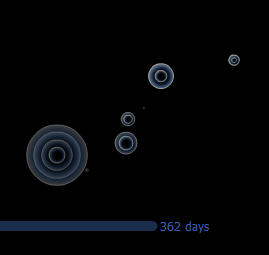
The graphic you see at left is a screenshot taken from an entertaining Flash visualization published by FeedBurner to illustrate the astounding increase in the number of RSS feeds registered with the company since 2004. FeedBurner is one of many companies that have emerged in recent years to create and manage RSS feeds. The company currently manages 227,000 text, audio and video feeds for 145,000 publishers — primarily news sites and blogs — with nearly 1,000 new feeds created every day. Click the screenshot to see a vivid demonstration of the phenomenal growth of this new technology.

What is RSS?

RSS stands for really simple syndication. RSS feeds are XML-formatted, machine-readable descriptions of your content that can be picked up and indexed by news and blog search engines like Technorati and feed readers and aggregators like BlogLines or NewsGator. Users then subscribe to receive updates automatically.

Like blogging, RSS is often associated with Web 2.0. The technology is still so new that, according to Yahoo, only 4% of Internet users have knowingly used it (although this figure is higher in the early adopter world of blogging).

Creating a feed gives readers the ability to receive your words of wisdom without having to lift a finger. But your feed becomes an especially potent blog marketing tool when combined with a ping service such as Ping-o-matic or Pingoat. These services let you literally summon the news readers and feed aggregators. Most are quick to respond; many come by and index your latest post within hours, if not minutes. Best of all, they automatically notify your subscribers that you have new material available.

Together, these technologies allow you to push content out proactively. This capability — more than anything else — distinguishes blogs from HTML-based mainstream sites in terms of marketing. Regular sites must wait passively for the search engines to come find them, and then fight to be noticed in the jumbled heap of (mostly) irrelevant search results.

Adding an RSS Feed to your Blog

Feeds come in two flavours: Atom and RSS, with RSS enjoying wider support. For some reason, Blogger / Blogspot opted to provide only an Atom feed. This isn't a big deal. You can create an RSS feed using FeedBurner or a similar service, or let FeedBurner's SmartFeed program automatically convert Blogger's Atom feed to RSS.

Once you have burned your feed, link to it so that interested users can sign up to receive posts automatically. Place this link somewhere prominent, such as in your blog header. Make it easy for people to subscribe by creating sign-up links to your feed specifically for their favourite news readers and aggregators, as I have done below. Link to FeedBlitz or a similar service so subscribers can opt to receive posts via email.

Bottom line: if you don't have an RSS feed, you are not leveraging the full power of the Web for promoting your blog. For RSS tutorials and more detailed background information, see:

This post is part of a series on blog promotion. If you found it useful, please consider linking to Random Bytes. Sign up for our feed to ensure you don't miss future posts.

Saturday, March 18, 2006

Generate Everything from Graffiti to Web Buttons!


Regular readers of this blog will know that I'm a great fan of gadgets. I stumbled across another one a few days ago. The Glassy Button Generator will be of interest to web designers who are in a hurry and those who are aesthetically challenged. Just plug in a few variables, such as foreground and background colours, button dimensions, typeface, font size, etc., and this useful tool will crank out a round-edged glassy looking button for you to grab and save. It even creates rollovers.

I got this great find at The Generator Blog, another bookmark topper. This blog provides daily links to sites that generate all kinds of things from utter nonsense like the Silly Walk Generator, the Bush Speech Generator, and the Graffiti Generator I used to create the illustration for this post. These silly examples are utter time-wasters, but the Generator Blog links to dozens of useful resources too, like the Random Texture Generator and DiscoverySchool's Worksheet Generator.

The Generator Blog is a guaranteed time-gobbler. Check it out. And if you like these suggestions, please consider blogrolling Random Bytes.

Friday, March 17, 2006

Create Blogger Categories with Labelr

Yet another post on ways to add categories to the Blogger template. I have posted on this topic several times before, while I experimented with and refined a hack involving Blogger's search function. Up til now, this has been the only workable solution (other than using Technorati or del.icio.us tags). I haven't been too happy with it, mainly because the matches produced were of poor relevance, despite all my tweaks.

I am currently beta-testing a new solution, Labelr, developed by Amit Upadhyay. You're seeing the results in the left sidebar. Give it a try. Click any category and matching posts will be displayed right in this blog, instead of in the Blogger search window.

Labelr is fairly easy to implement, though it could be better documented. It involves pasting a few short lines of code into your Blogger template and then assigning one or more labels to each post. Upadhyay has added some nice features, including a bookmarklet that lets you tag posts and manage categories on the fly.

There are a few minor issues yet to be resolved, but — so far — this appears to be an elegant solution to a vexing problem. (Note: if you use Norton Internet Security, you will have to disable its privacy settings to let Labelr work its magic.)

Promoting Your Blog

A response to Wednesday's post about this blog's stats got me thinking about how blog promotion strategies differ from mainstream web site promotion, and how the very nature of blogs means you have to adjust your thinking to build traffic and encourage repeat visits.

Blogs differ from mainstream web sites in several key ways. These offer both advantages and challenges in terms of traffic generation. This post will act as a landing page from which to explore this topic. I will be building links below as I develop each of these ideas, so please check back often.

Attracting Site Visitors

  • Monitor your site stats closely, especially for the keywords visitors are searching on.
  • Push content out proactively with RSS feeds and ping services. This ability to summon search engines to come crawl you gives blogs a huge advantage.
  • Get listed in the key blog directories. There are more of these every day, and listings are almost always free.
  • Consider blog traffic exchanges, which generate traffic to your blog based on the time you spend surfing other people's blogs.
  • Get blog-rolled. Getting links from other people's blog rolls is one of the best ways to drive traffic to your site and increase your search ranking.
  • Get stumbled upon, dugg, furled, and listed in every link popularity and social bookmarking site you can find — there's nothing better than a recommendation from fellow surfers
  • Use keywords strategically, to get your posts found in both conventional and blog search engines.
  • Tag content so people can find you by focusing on their area of interest.

Keeping Site Visitors

It's one thing to entice people to your site. It's another thing entirely to get them to stick around, let alone keep 'em coming back for more. This is especially true when visitors land randomly on a page through traffic exchange sites and stay only long enough to earn credits. The likelihood of these visitors finding content relevant to their needs is low. Visitors arriving through search engines stay longer, and explore the site, because they have located a document that meets their needs. Here are some ways to engage your less focused visitors:

  • Write well and write about what visitors are interested in.
  • Add graphics or photos to draw people into your copy. (I need to take my own advice!)
  • Cross-link posts strategically to aid navigation (this is critical).
  • Put permanent links to your most popular posts in your sidebar.
  • Post new content frequently.
  • Make it easy for people to subscribe to your feed.
  • Keep the design clean and the site fast-loading.

I will be fleshing these ideas out in several posts over the coming days, so please check back, or sign up for our feed to be sure not to miss anything. And if there are strategies that have worked for you, please take a moment to share them through this blog's comments feature.

Wednesday, March 15, 2006

Blog Promotion: What Do Your Stats Tell You?

It's no secret that I started Random Bytes to build interest in WebLens and to direct additional traffic there, which it has done quite successfully. Interestingly, though, the audiences for the two sites differ radically, a fact made clear in site stats. The differences are worth sharing here since my blog's audience may represent yours too.

Audience Characteristics

I have discovered, in poring through my stats, that this blog's audience — that's you, folks — consists of what marketing types would call early adopters, whereas my WebLens audience is more mainstream.

This blog's audience is more adventurous than the WebLens audience. At the risk of generalization, I would venture that you have a greater appreciation for innovation, are more tech-savvy, and are more likely to take risks. This is reflected in the fact that an astounding 65% of you use Firefox or another non-IE browser. My WebLens audience is more conventional, at 82% IE use. (Serious implications here for standards-compliant web design and cross-platform testing.)

Screen Resolution

With respect to screen resolution, it would seem both audiences are right in the middle, with 65% of the WebLens audience working at 1024 x 768 resolution, versus 61% of the Random Bytes audience.

The difference is seen at the top and bottom extremes, with 5% of Random Bytes visitors at 800 x 600 versus 17% of the WebLens audience. Conversely, about 20% of you are viewing this page on 1280 x 1024 screens versus 10% of the WebLens audience!

Once again, these discrepancies have obvious implications for web design, and I'm glad I took the time to make sure both sites work well at all resolutions! I'm also glad I took the time to create a non-Javascript version of Weblens, since up to 5% of site visitors surf with scripting disabled (versus 1% of Random Bytes visitors).

Operating Systems

Once again, choice of operating system varies significantly at the low end, with 13% of WebLens users on Win98 versus 4% of Random Bytes' audience. The other Windows variants (XP, 2000, 2003, ME) represent approximately 86% and 83%, respectively, of the Random Bytes and Weblens audiences. Mac users represent roughly 2-3% of both audiences.

Traffic Sources

Mostly importantly, the source of the traffic is markedly different. WebLens' visitors come primarily from universities, colleges, libraries, K-12 schools, governments, and other institutions, via search engines, directories, and links from such entities. WebLens has been around since 1994, so it enjoys healthy link popularity.

On the other hand, this blog is new; its audience still growing, with minimal traffic coming from mainstream search engines. Instead, people are finding Random Bytes through blog search tools like Technorati, through feed aggregators like BlogLines, via people's blogrolls, and via blog directories and link exchanges like BlogExplosion or BlogClicker.

These alternate traffic sources, combined with proactive dissemination of blog content via RSS, render blogs an effective new channel for promoting conventional web sites like WebLens.

Site "Stickiness"

I have succeeded in getting you here. My challenge has been to keep you hanging around longer. A discouraging 80% of you linger here less than 5 seconds. It's a little better over at WebLens, where only 66% of the audience clicks away in 5 seconds or less.

I have taken a number of measures to increase site "stickiness" at WebLens. One that has started to pay off is the scattering of strategic cross-links throughout pages. If someone is already on a page of Scholarly & Academic Research resources, why not offer them a link to Reference Tools & Dictionaries? It's working well, and I'm already seeing pages that have been languishing moving up in hit counts.

I'm curious to know if these stats mirror your experience. Do they matter? Do you think the blogosphere is "different"? Share your thoughts, and sign up for our feed to be sure not to miss future posts.

Monday, March 13, 2006

Google Surveys Mars

Amateur astronomers will be delighted to learn that Google Labs has released a new application, Google Mars, today. A click on today's Google logo will take you to this interesting application, which resembles the Google Maps interface superimposed on the surface of Mars.

Browse the Martian landscape using the zoom or panning controls, or select from among three data views. Elevation provides a colourful relief map, generated from data collected by the Mars Orbiter Laser Altimeter. Visible presents a mosaic of images taken by the Mars Orbiter Camera (MOC); both from NASA's Mars Global Surveyor spacecraft. A third Infrared view is generated from data collected by the Thermal Emission Imaging System (THEMIS) on NASA's Mars Odyssey spacecraft. For more information, see ZDNet's Google Blog.

Sunday, March 05, 2006

Fill in the Blanks with Google's Whole Word Wildcard

At one time, most search engines supported the use of a special character called a wildcard. Usually represented by an asterisk (*), wildcards could be used to substitute for different character combinations, allowing you to catch words with variable endings, or to fill in when spelling is uncertain.

In search engines that support wildcard use, typing nutrit*, for example, returns pages containing not only nutrition, but nutritional, nutritionist, nutritious, etc. (This still works in eBay — try typing collect*, for collectible, collectable, collectibles, collectables, collection, etc.)

Google is one of the few search engines to still support wildcard use, though it does so in a unique way. In Google, the asterisk (*) functions as a whole word wildcard, replacing one or more entire words within your query. This makes it a powerful tool for constructing fill-in-the-blank queries. Such queries are handy in a variety of scenarios. Here are some examples:

  • Use them to compensate for a faulty memory or to complete missing bits of poems, song lyrics, or literary passages. Suppose, for example, you've forgotten parts of the third line of the nursery rhyme Mary Mary Quite Contrary. In Google, type "with * bells and * shells and pretty * all in a row". The search engine will fill in the missing words. Silly example, but the principle applies universally.
  • Use the same approach to find people, especially when you don't know someone's middle name or how he may be referenced on his web site. "george * bush", for example, produces a different result than "george bush".
  • Try them in situations where you are looking for parallel sets of pages or where you wish to extract documents containing a variety of descriptors. "Excel * course", for example, will retrieve Excel 2000 course, Excel 2002 course, Excel training course, Excel 2002 training course, and so on. Even better, "excel * level * course" will retrieve both Excel 2002 Level 3 course and Excel 2003 Level 2 course.
  • Can't quite think of the right word? Use a whole word wildcard to check popular idiom. I use them for this purpose frequently. Recently, for example, I needed a term referring to people in the marketing industry, but couldn't think of the exact word I wanted. A quick Google query on the phrase "that marketing * call" produced the words types, folks, mavens, people, gurus, experts, consultants, specialists — even drones and bozos.

Take some time to experiment with this humble character. Be sure to express your query as a phrase (i.e. enclose it in double quotation marks) and to construct it in such a way as to prompt Google to fill in the blank.

If you found this tip helpful, please consider linking to Random Bytes. Signing up for our feed will ensure you don't miss future posts.

Friday, February 24, 2006

It's All Been Done Before ...

Lately, I’ve been thinking a lot about the infancy of the Internet — those glory days when the Web was new and everything was different and exciting. Back in 1994, there was no Amazon, no eBay, no PayPal. No broadband. Altavista was the search engine of choice; Google wasn’t even a twinkle in its fathers’ eyes.

The Web was a wild new frontier, full of experimentation and possibility. It was a people place where “information wanted to be free” and people built web sites out of curiosity, altruism, and idealism. It was a world of bright ideas and innovation, when one could get wildly excited about tables, frames, and animated GIFs.

It was a world focused on information sharing, collaboration, and empowerment. You heard a lot of talk about the potential of technology for bringing about social change and “levelling the playing field.” Newsgroups and web forums let people post and share ideas, support one another, and debate important issues.

Then, along about 1997-1998, the corporate world woke up to the profit potential of the Web. In a few short years, the Web was hijacked by big business, commoditized, and transformed into an ecommerce money machine — spelling the end of an era of people power and grass roots innocence.

Soon, nothing wanted to be free. Popular sites began charging for information. Advertising ruled. Then came the consolidations. Big fish gobbled up the smaller fish. Mergers and acquisitions became the order of the day. Only the strong survived.

Then, around the turn of the millenium, a new trend emerged. The blogging phenomenon was born, quietly and with little fanfare — launching a widespread grass roots revolution and a triumphant resurgence of people power. Today, servers everywhere groan under the strain of an estimated 28 million blogs and counting.

These days, I’m experiencing a strange sense of déja vu, coupled with uneasy glimmerings of impending doom. To quote the Barenaked Ladies, it’s all been done before ... Remember Zeal? This novel experiment was based on a breakthrough concept and enjoyed a strong and dedicated user community. It was a forerunner of today’s social bookmarking and tagging sites like Wink, StumbleUpon, and Furl. Today, Zeal is part of the LookSmart network (as is Furl).

The phenomenal growth and impact of blogging; the advent of exciting new technologies; the wild and wooly sense of novelty and innovation; the feeling of community — it all puts me in mind of the heyday of the early Web.

But it’s all still free. The blogging tools, the massive volume of information being pushed out into the blogosphere, the ancillary resources. Sure, some blogs are monetized by AdSense, but this brave new world hasn’t yet sold its soul.

How long til it does? It’s just a matter of time, of course. The corporate hounds are smelling money to be made, and already there are signs that business has awakened to the profit potential of the blogosphere.

Here we go again ...

Tuesday, February 21, 2006

Web 2.0: Doing the Monster Mashup

I learned a new word recently. According to Wikipedia, mashups are web hybrids that combine content from multiple sources into a single integrated user experience, using APIs, Javascript, and Web 2.0 technologies such as RSS feeds.

I had recognized for a while that this kind of integration is going on, but I didn't know it had a name. Another entry for the jargon dictionaries!

Companies that make their APIs publicly available include eBay, Amazon, Google, Yahoo, Flickr, and Skype, which is why we frequently see mashups pulling content from these sites, along with feeds from Digg, Slashdot, del.icio.us and others.

Typical of this new functionality are sites like Internet Bargain Center, which extracts eBay listings by zip code, and MashMap, a geographic movie listing service. The Flickr amusements I have written about previously here are also examples of mashups.

Already, numerous sites have sprung up to keep track of these hybrids and to announce new mashups as they come onstream. Two notables are Mashup Feed and Programmable Web.

Comments? What do you think of mashups? The greatest thing since sliced bread or a dog's breakfast?

Thursday, February 16, 2006

Another Cool Color Tool

I love stumbling across useful online tools and gadgets, especially those that make web design chores easier and more enjoyable. Earlier, I blogged about a useful tool for generating intermediate shades of colour.

Staying on this theme, here's one of the sweetest little color generators I have ever seen. Petr Staníček's site, WellStyled.com, contains a Color Scheme Generator that lets you creates color schemes with a single click of the mouse. Click on one of the color swatches arrayed around the onscreen color wheel and this nifty tool will create a four-colour scheme for you.

This is one of the most elegant applications I have seen. Additional features let you select among five types of colour schemes; choose a web-safe palette, if desired; vary the degree of opacity (he uses the term pastel); even view your colour scheme as persons with various types of color vision impairment might see it.

Available color schemes include monochromatic (various tones of the same hue), complementary (two colors diametrically opposite on the colour wheel), analagous (adjacent colours), triads (three equidistant colours), and tetrads (four equidistant colours).

Truly worthy of your favourites list, (though professionals should note that the model used is closer to classic subtractive (pigments-based) color theory than additive (light-based), and that the RGB conversions are approximate).

Another, similar but less full-featured tool recommended by a reader of this blog is Color Schemer Online. It, too, allows you to click on colour swatches and to lighten and darken schemes.

Have a favorite color tool? Let me know about it via comment. And if you enjoy these posts, please support the site by linking to Random Bytes. Sign up for our feed to be sure not to miss anything.

Sunday, February 12, 2006

Google the Math Whiz

This falls into the betcha didn't know category. Or maybe you do, if you're a Google junkie like me ...

Besides being the Net's foremost search engine, Google is a math genius. Its handy calculator feature lets you perform quick arithmetic operations. Just click in the Google search field and type your arithmetic statement, using standard spreadsheet operators (+ to add, - to subtract, * to multiply, and / to divide).

Ask Google 4+4/2, for example, and it will dutifully report back 6. (The 6 result is because multiplication and division are performed before addition and subtraction. To change the order of operations, put parentheses around the numbers to be added, as in (4+4)/2. Now Google will respond with 4.)

Metric Conversions Too!

The math functionality is handy for calculating expenses, the sales tax portion of a bill, all kinds of things. But it gets better. Google will also convert metric to imperial and back again. Ask this digital savant, for example, to compute 285 miles in km and it will tell you that the answer is 458.66304 kilometers. Ask it for 78 f in c and it will tell you that it's 25.5555556 degrees Celsius outside (OK, maybe not outside this house).

Use it to convert to/from metric when you're cooking. Google quickly confirms that 4 cups in litres is 0.94635295 litres, that 6 oz in grams is 170.097139 grams, even that 12 teaspoons in cups is 0.25 US cups.

Like this tip? Stay tuned for more great things you can do with Google. Sign up for our feed to be sure not to miss anything. And if you find these posts helpful, please support the site by linking to Random Bytes.

Thursday, February 09, 2006

Build a Three-Column Blogger Template!

Update: need a widget-friendly version of this template for New Blogger? See this post.

Some time back, in writing about the many template hacks this blog has undergone, I promised to share how Random Bytes morphed into three columns from the original two-column Minima design created by Doug Bowman. The volume of queries on this topic in my stats tells me that a lot of other Blogger users want this flexibility.

Fortunately, it isn't hard. Switching the default two-column layout to three requires a few modifications to your template. Here's how to proceed:


  1. First, back up your current template, just in case anything goes wrong. I usually just copy it to a Notepad file on my desktop. (Open the Template tab, click inside the template area, press Control+A to select the entire document, and Control+C to copy; then switch to Notepad, press Control+V to paste the document, and Save.)
  2. Go back to your Blogger template and scroll to the embedded stylesheet at the top. Add a new style to format the left-hand column. Mine looks like this:
    #SidebarLeft {
    position:relative;
    width: 20%;
    padding-right:.5%;
    float:left;
    margin-left:.5%;
    clear: none;
    text-align: left;
    }
  3. Locate the HTML part of the document. To create a left-hand column, as in this blog, open the SidebarLeft div (type <div id="SidebarLeft">) immediately after the <div id="content"> tag. Put a closing </div> before the Main div. This partitions off the left 20% of the screen for a sidebar — now you can put any content you like between this pair of divs. In this blog, I have placed the Archives on the left, along with categories, popular posts, and RSS feed icons. (Note: If you are using another template, the style names may differ, but the same principles apply.)
  4. Return to the top of the template and tweak the other main content styles to accommodate the new design element. You'll need to make the central text area narrower and set its left and right margins to auto. You may also need to reduce the width of the existing right-hand column. Experiment with width, padding, and borders of the styles until you have a design that works. Here are the settings I used for this blog:
    #content {
    width:78%;
    margin-top:15px;
    margin-left: auto !important;
    margin-right: auto !important;
    padding:0;
    text-align:left;
    }
    #main {
    width:53.5%;
    float:left;
    padding-left:1.5%;
    padding-right:1%;
    border-left:1px dashed #ccc;
    border-right:1px dashed #ccc;
    }
    #sidebar {
    width:19.5%;
    float:right;
    margin-right:.5%;
    padding-left:.5%;
    }
  5. Optional: There may be other styles based on the original Sidebar style that format elements within a column. In Doug Bowman's Minima template, for example, the #Sidebar style is specified with three contextual selectors (ul, li, and p). These control the formatting of bullets and paragraphs in the sidebars. If you want similar formatting for the other side of the screen, locate and clone these styles under the #SidebarLeft designation, as follows:

    #SidebarLeft ul {
    margin:0 0 1.5em;
    padding:0 0 1.5em;
    border-bottom:1px dashed #ccc;
    list-style:none;
    }
    #SidebarLeft li {
    margin:0;
    padding:0 0 .25em 15px;
    text-indent:-15px;
    line-height:1.5em;
    }
    #SidebarLeft p {
    color:#666;
    line-height:1.5em;
    }

  6. Save your template changes and preview your blog. If you're satisfied, re-publish and share your handiwork with the world!

I have provided the complete template here, in case you have problems making the changes described above. Just open the link, view the source code, and save to your desktop or copy and paste into your Blogger template, after deleting the existing code. (Warning: doing this will undo any customization you have done, so you may want to backup first.)

Hope this works for you. If you find these solutions helpful, please consider linking to Random Bytes and sign up for our feed to be sure to receive new articles promptly.

Wednesday, February 08, 2006

Form Fields Can Really Mess With Your Layout

I was at a friend's house the other day, and got an unpleasant shock when I checked this blog on her computer (XP, running Firefox at 1024 x 768 resolution).

One of the challenges of CSS-based design is the problem of floats jumping around when screen fonts are resized. (You can see it happen for yourself on a lot of blogs and web sites — just press the Control key and scroll the mouse wheel toward you. You may see parts of the screen jump around, especially as the type gets larger.)

I had worked hard to eliminate the problem on this blog, testing the three-column layout on a variety of browsers and at various screen resolutions. (It usually occurs when your floated DIVs and their margins, padding, borders, etc. add up to more than the width of the containing DIV.)

Everything seemed to be working fine on my computer, so I was truly perplexed to once again see a missing right-hand column on her machine, configured identically. It had popped down below the middle column, well off the bottom of the screen. (Tip: if you find this happening on other blogs, try scrolling down to locate the missing content.)

Then it dawned on me: one of the most recent changes I made here was the addition of the FeedBlitz subscription form at the top right of the screen. I hadn't even looked at the code I pasted into my template. The input field had a default size of "26" — too wide for the column. Sure enough, reducing it to "20" solved the problem.

So, another lesson learned: remember to re-test at various screen resolutions and in different browsers whenever you make code changes that could affect site layout. Never assume that — just because you have already thoroughly tested a design — you can rest on your laurels!

Thursday, February 02, 2006

Eric Myer's Digital Photo Sleight of Hand

Being a bit of a shutterbug myself, I love surfing photography sites. Here's one that I have been meaning to share with you for a while now.

Eric Myer — not the Eric Meyer of CSS fame — offers a playful little amusement called Stereotypes. Done with Javascript, this innovative game lets you produce composite portraits that result in some truly bizarre-looking individuals. You can even generate a slide show that will combine faces randomly. The strange thing is these digital chimeras look oddly real, like the sort of people you'd expect to encounter at a carnival or lolling about downtown Las Vegas.

Check out Myer's portfolio too. He seems to specialize in portraits, even in his corporate and advertising work. He likes to position his subjects in odd ways or against gaudy backgrounds. The result is captivating. A must-see for anyone interested in portrait work.

Sunday, January 29, 2006

Restore Lost Google Ranking with Section Targeting

Have you noticed a change in your Google standing lately? WebLens was among many sites to suffer a nasty clobbering from the latest update of Google's ranking algorithm, code-named Jagger.

This important Google update coincided with a recent re-launch of WebLens, after much work on a new look and feel. I unknowingly published the revised site right around the time that Jagger made its debut. (It was also just before Christmas, which is never a good time to release anything important. What was I thinking!?!)

I watched with mounting bewilderment and dismay as my traffic plummeted and WebLens became virtually unfindable on any of its previously reliable keyword combinations. The site had never had top ranking, but WebLens had, for many years, consistently placed high on several important queries. Now, it was like I had slid right off the map — well, out of Google's universe anyway, despite good use of keywords and careful optimization.

After I calmed down and began to research the issue, I quickly learned about the Jagger update and its impact on the SEO world. A lot of well-established sites took a beating; many dropped steeply overnight. Some, like WebLens, slid into virtual oblivion, unfindable in screen after screen after screen of results.

I began to suspect that my problem was stemming from more than just Jagger. I knew Javascript was an SEO no-no; perhaps the Javascript-intensive nature of the new site was presenting bigger problems for Google than I had expected.

Around this time, I stumbled across an AdSense blog, which recommended Google section targeting as a way to improve ad relevance. This technique involves containing the parts of a page that you wish Google to crawl within a pair of special comment tags.

Would this help Google to bypass the problematic Javascript, I wondered. It took seconds to paste section targets into all my pages and re-submit the site. To my shock, I discovered that my lost ranking was not only restored, but improved, almost immediately. The relevance of the ads served by Google's AdSense program also improved.

Best of all, WebLens' rank in other search engines has also improved — most notably MSN — leaving me wondering whether Google's competitors may be taking these code snippets into account as well.

If you need to boost your Google ranking or Adsense ad relevance, give it a try. Here's how it works:

  • Open the page you wish to optimize and locate the text you wish to emphasize
  • Paste <!-- google_ad_section_start --> before the words or passage
  • Paste <!-- google_ad_section_end --> after the passage
  • Save the page and re-submit to Google

You can repeat these paired comments as many times as you need to within the document. Just make sure that every opening comment is closed. If you have a lot of pages to do, use your editor's Find and Replace command to speed things up. (Back up first, just in case. I have wept more than once after a careless F&R.)

One caution: Google does warn that you need to include a significant amount of content within the section targeting tags (insufficient content may result in less relevant ads), and that it is against Adsense program policies to use section targeting to emphasize words that are not relevant to the content of your pages.