Spread the Word

Site Feed


Powered by FeedBlitz

Subscribe with ...

  • Add this blog to my Technorati Favorites!
  • Subscribe in Bloglines
  • Subscribe in NewsGator Online
  • Subscribe in Rojo
  • Add Random 

Bytes (WebLens Blog) to Newsburst from CNET News.com
  • Add to Google
  • Add to My AOL
  • Subscribe in FeedLounge
  • Add to netvibes

Translate This Post

Burn a Feed

Ping the World

Friday, April 21, 2006

Dont Click It: Interface Breakthrough or Usability Nightmare?

I stumbled across an interesting experiment in user interface design a couple of days ago that may make you re-evaluate your relationship with your mouse. How hooked are you on clicking that button? Can you explore a web site without using your index finger? How easily can you navigate when deprived of a mouse click and a keyboard? How will you feel about the experience? Should you even care?

We are so accustomed to the point and click approach to navigation that clicking on something that interests us is second nature, almost instinctive. Or so believes the Institute for Interactive Research. They built an experimental Flash-driven site to learn more about how people interact with content, and whether there's a better way.

DontClickIt is a content-rich site that will challenge you to experience it fully. It provides background information about the rationale for the project and several user interface experiments you can participate in. It even lets you spy on others who have visited the site.

This is a site you will either love or hate. I imagine many people click away after only a few seconds. If you can stick it out and get the hang of it, there's some very interesting content there. So, what's your take? Visit DontClickIt and drop a comment back here. Web breakthrough or usability nightmare?

Tuesday, April 18, 2006

Two Techniques for CSS Transparency

One of the trickiest things to control, in a CSS-driven design, is the transparency of the interaction between foreground and background content. Browser inconsistency — most notably IE's stubborn refusal to comply with standards — only adds to the challenge. I was struggling with this until I ran across Stu Nicholls' CSS Play web site. This site abounds with powerhouse CSS demos, including some great cascading menu effects and the best examples I have seen of the differing transparency approaches possible with CSS.

Background

(For the non-techies in the crowd, the term transparency — also called opacity — refers to how much of the background is visible through the foreground on a web page. Until the emergence of CSS, web designers had limited control over transparency. We could use transparent GIF images, which offer all or nothing in terms of transparency (i.e. the background is either 100% transparent or 100% opaque), or we could resort to the PNG graphic format, which offers true alpha transparency but limited browser support. (For details, and for some useful IE PNG hacks, see A List Apart's posting about the PNG format). The only other solution has been a kludgy workaround involving placing a lightened duplicate of the background image in the foreground. Nicholls illustrates this approach as "method 3" on his page of opacity demos.

Clever CSS3 Transparency Hack to the Rescue

One of the solutions that Nicholls demonstrates ("method 1') utilizes a clever cross-browser code hack that marries IE and Mozilla proprietary code with an opacity property that is part of the CSS3 working draft. It is an elegant solution that affords complete control over degree of transparency. This technique essentially involves creating and styling two DIVs — one to contain the background and a second to hold the foreground text (if they were in the same DIV, the foreground text would be transparent too). The HTML looks something like this:
<div id="sidebarLeft"> </div> <div id="leftwords">
<H3>Left Column</H3>
...
</div>

Note that the "sidebarLeft" DIV is empty. Its sole job is to provide a hook to hang a style on, in this case one called "sidebarLeft." This style is formatted as per normal, in terms of padding, margins, width, height, etc. but, then — and here's where the magic happens — for a transparent effect, the CSS snippet below is added.

#sidebarLeft{filter: alpha(opacity=75);
filter: progid:DXImageTransform.Microsoft.Alpha(opacity=75);
-moz-opacity: 0.75; opacity:0.75;
}

Another style (#leftwords) formats the text block placed against the background. To illustrate how this hack works, I have prepared a new version of the three-column template discussed here earlier with this opacity effect for the left sidebar. Feel free to download the template, called White True Opacity, and experiment with level of transparency. To do so, open the template and change the values highlighted in orange above to any number between 1 and 100. Change the values highlighted in blue to a number between 0 and 1. Lower numbers will make the item more transparent; higher numbers, less so. Save and reload the page.

Shown as "method 1" on Nicholls' site, this transparency effect is cool, but be aware that it uses techniques that are not standards compliant and which lack wide browser support.

Low-Tech Transparency for the Rest of Us

Fortunately, there is another technique that designers have long resorted to, and which doesn't break any browsers. It's a low-tech workaround that's quick and easy to implement. It, too, is a "hack" — using a PhotoShop trick to create a 50x50 tile that fakes the appearance of transparency. Firda Beka shows how it works here, and offers a nice selection of ready-made 50x50 background tiles you can grab and save. To use these in a stylesheet, just add this declaration to the style for the element you wish to format:

background:url(filename.gif);

where filename.gif is the 50x50 semi-transparent GIF you just made or downloaded. Save your work and re-load the page. Try it with several of Firda's 50x50 sample tiles. Whether the resulting effect is gorgeous or hideous will depend largely upon other foreground and background colours in your design. You can experiment with this technique using this template, called White Fake Opacity, if you like. Just replace the GIF that I used with a colour of your choosing.

Please feel free to use either or both of the designs I have posted here. To put your own stamp on them, just save them to your desktop, open, and modify the styles as needed, and substitute your copy for the placeholders. If you're hand-editing the code, be careful not to delete any of the DIVs, or you'll break the layout. And if you're finding these posts useful, please support Random Bytes with a link from your blogroll.

Monday, April 17, 2006

Logo-Surf Web 2.0 Sites with BuzzShout

A couple of days ago, I posted about an interesting Web 2.0 social bookmarking service. With Web 2.0 constituting the latest Internet craze, many people are keen to track emerging players in these hot new technologies. While there are lots of Web 2.0 lists out there, the newest site to join the fray offers an entertaining twist.

BuzzShout is a new directory that provides user-rated and reviewed listings of Web 2.0 sites. You can browse the list by tag cloud, alphabetically, or by user rating. Alternatively, check out BuzzShout's LogoSurf page. It offers an entertaining way to explore the web's newest leading-edge applications, while retaining the ability to focus your interest by clicking on a tag cloud.

If you're into Web 2.0, this site is one to keep an eye on.

Saturday, April 15, 2006

ESPN and Orbitz Team to Offer Sports Travel

Now there's a marriage made in heaven. ESPN and major travel booking site Orbitz have teamed to provide ESPN Sports Travel, a travel booking site catering to sports fans. Whether it's hockey, soccer, basketball, or golf, sports buffs can look up schedules and book trips without leaving the ESPN site.

In addition to sports news, schedules, and statistics, the new site offers a sports trip planner, with upcoming dates for all kinds of sports events. To help in researching your planned destination, ESPN has published 16 city guides, with plans in the works for another 34. The guides cover off local stadiums, arenas, golf courses, local sporting events, and more.

The site can be found at ESPN Sports Travel. For hundreds of other city guides and travel planning resources, see WebLens travel tools.

Friday, April 14, 2006

Stumbling Onto Web Treasure

Wow. Am I tired. I stumbled onto StumbleUpon last night, staggering bleary-eyed into bed at 2:00 a.m. Even then, I could barely tear myself away from the computer (not a good sign). Actually, I've been aware of this site for a while as I have noticed traffic originating there in my stats. Last night, I decided to take the time to explore it. My surfing habits will never be the same again, thanks to this Web 2.0 service.

Like Digg, del.icio.us, and many others, StumbleUpon is a social bookmarking tool that allows users to tag and rate recommended sites and build community around themes. It offers a huge selection of categories, which you can explore from a toolbar. The system learns your preferences quickly, and you are presented with a limitless selection of quality sites on any subject that interests you.

Unlike typical traffic exchanges, there's no timer, no advertising or spam sites, and no junk. The stumbled upon sites are fun and innovative, with good spam control and no annoying pop-ups. I made the mistake of exploring the photography category, and spent several hours stumbling through some exquisite eye candy. Here are just two of the many gems I discovered:

Stay tuned for more great photographic finds and other social bookmarking tools. And if you enjoyed this post, sign up for our feed for more on this topic.

Wednesday, April 12, 2006

At-a-glance Global Page Rank Info!

Anyone struggling to optimize site content for better search engine positioning will sooner or later have reason to obsess over Google's secretive Page Rank formula, the numerical weighting the search giant assigns pages in order to sequence results. I have long wished there was an easier way to determine page rank than viewing each WebLens page, one at a time, in the Google toolbar. Now there is.

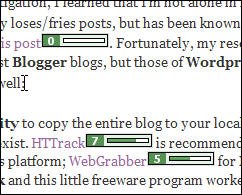
As reported yesterday in SearchEngineWatch, WebMasterEyes is a handy little utility that overlays Google page rank icons on every link in any page viewed onscreen. The result is literally an at-a-glance overview of the page ranks of all pages linked from anywhere. Try it yourself. This one's a keeper!

The only down side is the rather slow response time. But when you think about the job this little tool is doing, it's not an unreasonable wait.

Addendum: Some people claim a page rank of 5 or better is key to getting high placement. But, as SearchEngineWatch observes, "Google PageRank is not the final say in ranking well in Google. Google claims it is used for determining crawl frequency and other ranking aspects. But many SEO professionals have uninstalled the Google toolbar, to make a statement about PageRank's worth."
Found this information helpful? Sign up for our feed so you won't miss future postings.

Friday, April 07, 2006

Have You Backed Up Your Blog?

I've been having too many heart-pounding moments lately, courtesy of Blogger, which lost yesterday's post twice. This happened first in the middle of saving, and then — after painstakingly rebuilding the whole thing — Blogger trashed it again upon attempting to publish. On investigation, I learned that I'm not alone in my frustration; Blogger routinely not only loses/fries posts, but has been known to wipe out entire blogs, according to this post. Fortunately, my research led to several ways to back up, not just Blogger blogs, but those of Wordpress, Typepad, and Moveable Type as well:

  • Use an offline browser utility to copy the entire blog to your local hard drive. Several such programs exist. HTTrack is recommended by many bloggers for the Windows platform; WebGrabber for Mac users. I downloaded HTTrack and this little freeware program worked like a hot damn. It was quick to install and easy to use. Just follow the onscreen prompts and it will make a complete copy of your blog on your local hard drive. It took about ten minutes to back up my blog, which I can now surf offline if I want. Everything's there — formatting, all the posts, the archives, comments, internal and outbound links, even web badges are where they should be. This little utility is worth its weight in gold.
  • Use Blogger itself. There's no obvious and easy way to backup from the Dashboard but, buried in Blogger's help menu is this knowledgebase article, bearing somewhat complicated (and, in my opinion, risky) instructions for re-writing your template to publish all your posts to a single page, which you can then save to your local hard drive. This won't work if you've been blogging for a while, and your number of posts exceeds the limit Blogger places on the index page. (Agent BedHead offers a simplified version of these instructions which she will email to you, with versions available for all major blogging platforms.)
  • Email Posts to yourself. Digital Inspiration lists several ways to back up. Among them are instructions outlining how to configure Blogger's settings to automatically email posts to you. You can then set your mail rules to intercept and filter these into a folder.
  • Get the WayBack Machine to crawl your blog. It's as simple as going to their site and submitting your blog address. They are a little vague, though, about the availability of stored pages should you need to restore your blog down the road.

Note: In the course of rummaging around for blog backup solutions, I also stumbled across w.Bloggar, a freeware tool for composing blog posts offline. This would have prevented the problems I had yesterday with Blogger losing posts upon saving and/or posting. I have tried composing in WordPad and pasting into Blogger's editing window, but that's not an entirely satisfactory solution. I have downloaded w.Bloggar to experiment with, and I'll let you know how it works out. In the meantime, Digital Inspiration has nothing but good things to say about w.Bloggar.

Thursday, April 06, 2006

Promote Your Feed With an Autodiscovery Link

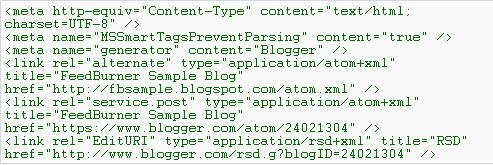
I learned recently that I wasn't taking full advantage of the power of this blog's RSS feed. Yes, I've burned a feed and scattered links to it throughout this blog, even in the header. But I wasn't taking advantage of a powerful feature in this blog's template: using the autodiscovery link to point to my RSS feed location. Inserted into your blog by the <$BlogMetaData$> tag, this bit of code tells news readers and web browsers the location of your feed address. By default, it points to Blogger's original Atom feed. This could result in people unwittingly signing up on the old feed and your feed stats being wildly inaccurate.

Since RSS is more popular than Atom, you may want to ensure that autodiscover points there. If you're a FeedBurner user, there's no need to worry about abandoning Atom users, since FeedBurner's SmartFeed service automatically translates your feed into a format compatible with any feed reader. Just be sure this feature is enabled in your FeedBurner Optimize options.

Tweaking the Autodiscover Tag

To make autodiscover point to your RSS feed, you need to modify the Blogger template. Here's how, courtesy of a post in the FeedBurner forums:

  1. Load your blog onscreen and view its source code (click View Source from your browser menu).
  2. In the header area at the top of the file, locate a block of code that looks similar to this:


  3. Copy the entire block of code (there could also be a couple of <style> and/or <script> tags following this that you may also want to include).
  4. Close the View Source window and open your blog template.
  5. Back up your template before proceeding further (open the Template tab, click inside the template area, press Control+A to select the entire document, and Control+C to copy; then switch to a text editor, press Control+V to paste the document, and Save).
  6. Locate the <$BlogMetaData$> tag near the top of the template and delete it.
  7. Replace it with the block of code you copied in step 3.
  8. Look for a line similar to the following in the code you just pasted:
    <link rel="alternate" type="application/atom+xml" title="Your Blog" href="http://yourblog.blogspot.com/atom.xml" />
  9. Change the URL in orange above to the address of your FeedBurner feed, as in:
    <link rel="alternate" type="application/atom+xml" title="Your Blog" href="http://feeds.feedburner.com/YOURFEEDNAME" />
  10. Save your changes and re-publish your blog.

    Note: to see the changes in View Source, you may first have to clear your browser's cache.

According to FeedBurner, this technique works whether your blog is hosted by Blogger or on your own server. For more information, please see:

I hope you found this tip useful. If you enjoy these posts, please support Random Bytes with a link from your blogroll. Sign up for our feed to ensure you don't miss future postings.

Friday, March 31, 2006

Find Out Who's Linking to You: What Google Won't Tell You!

There are a lot of great things you can do with Google, but locating sites that link to you isn't one of them. Links are vital for good standing in the Google SERPs (search results), but Google does not report accurate information about how well linked you are. You can use Google's link: query modifier in front of your domain name, as in link:www.digg.com, but this will only show who is linking to the top level of your domain. In the syntax shown here, for example, Google only reports 25,000 documents linking to Digg.

Worse, Google won't (reliably) identify sites that link to specific pages on a site, something that's vital to know if you're trying to improve results ranking or AdSense revenues. Recently, for example, I wanted to rename a page at WebLens to include a certain keyword, but first I needed to be sure it wasn’t heavily linked to. Google told me the page was a true web orphan — not a single link! Fortunately, there are ways to get more accurate information.

Sneak in the Back Door

A posting to the Spider Food boards suggests asking Google for pages that simply mention your site. To do this using the previous example, type www.digg.com -site:www.digg.com. This will show all the documents that mention Digg's url in regular text, excluding Digg itself. Google responds with 272,000 documents, many of which will contain links to Digg. Not a totally accurate indication of backlinks, but more substantial than 25,000.

Turn to Google Rival Altavista

Once the Web’s premier search destination, Altavista lost many of its powersearch features when it was taken over by Overture. It still has one useful function though: it will list sites that link not only to your top page, but to any page you specify. Using the Digg example above, typing link:www.digg.com confirms that 256,000 documents link back to Digg. When queried about my orphan page, Altavista reports that, in fact, it is linked by no less than 32 sites. To query a specific page on your own site, just use the syntax above and append the document name, as in link:www.yoursite.com/page.html. Exclude your own site by adding -domain:www.yoursite.com. (Note the domain (Altavista) versus site (Google) query modifiers.)

Check Your Link Popularity With Who Links To Me

I’ve saved the best for last. If you’re focused on blog links, don’t miss this site. Who Links to Me is a handy metasearcher that produces a quick summary of web sites and blogs that link to you, pulling results from BlogRolling, IceRocket, Technorati, Alexa, Yahoo, and MSN Search. Results are far more comprehensive than those produced by Google's link: modifier, and it even displays your Google page rank. Drawback: it won’t find links to specific pages, but you have Altavista for that.


I hope you find these suggestions helpful, and if you have a tip to share, please drop a comment here. If you enjoy these posts, please support Random Bytes with a link from your blogroll. Sign up for our feed to ensure you don't miss future postings on this topic.

Thursday, March 30, 2006

Google Tips & Tricks

One problem with the Labelr categories solution for Blogger is that you can't link to categories because they're generated on the fly with Javascript. All my postings on Google are in the Search I Google category at left, but I can't build a link to it. So, here's a landing pad for some of the Google tips and tricks I have blogged about to date. Check back often. This list will get longer.

If you have a tip to share, please feel free to post a comment. And if you enjoy these posts, please support Random Bytes with a link from your blogroll. Sign up for our feed to ensure you don't miss future postings on this topic.

Wednesday, March 29, 2006

Feed Changes: What Do You Think?

OK. My massive army of feed subscribers. This one's for you ...

You've probably noticed a couple of changes in my feed in the last day or two. I have switched to short excerpts instead of repeating the entire post, on the theory that:

1) you will more quickly be able to locate posts that interest you;
2) your eyeballs will last longer and you will curse me less;
3) you'll be more inclined to click through and explore the site.

I have also used FeedBurner's FeedFlare feature (cool alliteration — say that three times fast) to add quick links to tagging and social bookmarking sites. These appear both in the feed and in each blog post.

Questions:

1) Are there too many subscription/tagging links?
2) Would you find these useful?
3) Do you prefer short excerpts or full-length posts in the feeds you subscribe to?

I'd really love some feedback on this, so please take a moment and drop a comment here. Thanks.

Friday, March 24, 2006

Another Three-Column Template

Some time back, I wrote about how to modify the default Blogger template for a three-column layout, with a link to a completed template for those not inclined toward hand-coding. The template I provided works fine in Blogger but isn't appropriate for conventional web sites because of the embedded XML.

I've noticed a lot of people searching on this topic in my stats, so here's a 3-column template for regular web sites. This template creates a barebones tableless three-column layout using CSS. The design is minimal, with dummy text to illustrate where your content will appear.

To put your own stamp on this design, just save it to your desktop, open it, modify the styles as needed, and substitute your copy for the placeholders. If you're hand-editing the code, be careful not to delete any of the DIVs, or you'll break the layout.

Hope this works for you. Feedback welcome. And if you're finding these posts useful, please support Random Bytes with a link. Sign up for our feed to ensure you don't miss future articles.

Thursday, March 23, 2006

Puzzle Fans: Handheld Sudoku Game


A little off-topic, but it you share my passion for Sudoku, the 9-by-9 number logic puzzle craze that originated in Japan and is currently sweeping Europe and North America, you may enjoy this toy. $24.99 will buy you a handheld electronic Sudoku game with touchscreen and stylus. It's pre-programmed with over one million puzzles and eight difficulty settings, so it should keep you busy for a week or two.

This amusing gadget comes from ThinkGeek.com, a fantastic site featuring toys, gadgets, books, clothing, and more for the geekily-inclined. Looking for the perfect gift for the hard-to-shop-for techie in your life? You're guaranteed to find it here.

Great site, with full e-commerce functionality.

Wednesday, March 22, 2006

Blog Promotion: Push Posts Out With an RSS Feed

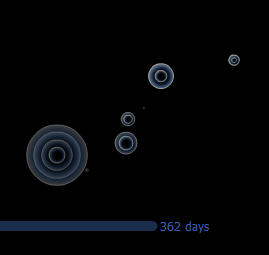
The graphic you see at left is a screenshot taken from an entertaining Flash visualization published by FeedBurner to illustrate the astounding increase in the number of RSS feeds registered with the company since 2004. FeedBurner is one of many companies that have emerged in recent years to create and manage RSS feeds. The company currently manages 227,000 text, audio and video feeds for 145,000 publishers — primarily news sites and blogs — with nearly 1,000 new feeds created every day. Click the screenshot to see a vivid demonstration of the phenomenal growth of this new technology.

What is RSS?

RSS stands for really simple syndication. RSS feeds are XML-formatted, machine-readable descriptions of your content that can be picked up and indexed by news and blog search engines like Technorati and feed readers and aggregators like BlogLines or NewsGator. Users then subscribe to receive updates automatically.

Like blogging, RSS is often associated with Web 2.0. The technology is still so new that, according to Yahoo, only 4% of Internet users have knowingly used it (although this figure is higher in the early adopter world of blogging).

Creating a feed gives readers the ability to receive your words of wisdom without having to lift a finger. But your feed becomes an especially potent blog marketing tool when combined with a ping service such as Ping-o-matic or Pingoat. These services let you literally summon the news readers and feed aggregators. Most are quick to respond; many come by and index your latest post within hours, if not minutes. Best of all, they automatically notify your subscribers that you have new material available.

Together, these technologies allow you to push content out proactively. This capability — more than anything else — distinguishes blogs from HTML-based mainstream sites in terms of marketing. Regular sites must wait passively for the search engines to come find them, and then fight to be noticed in the jumbled heap of (mostly) irrelevant search results.

Adding an RSS Feed to your Blog

Feeds come in two flavours: Atom and RSS, with RSS enjoying wider support. For some reason, Blogger / Blogspot opted to provide only an Atom feed. This isn't a big deal. You can create an RSS feed using FeedBurner or a similar service, or let FeedBurner's SmartFeed program automatically convert Blogger's Atom feed to RSS.

Once you have burned your feed, link to it so that interested users can sign up to receive posts automatically. Place this link somewhere prominent, such as in your blog header. Make it easy for people to subscribe by creating sign-up links to your feed specifically for their favourite news readers and aggregators, as I have done below. Link to FeedBlitz or a similar service so subscribers can opt to receive posts via email.

Bottom line: if you don't have an RSS feed, you are not leveraging the full power of the Web for promoting your blog. For RSS tutorials and more detailed background information, see:

This post is part of a series on blog promotion. If you found it useful, please consider linking to Random Bytes. Sign up for our feed to ensure you don't miss future posts.

Saturday, March 18, 2006

Generate Everything from Graffiti to Web Buttons!


Regular readers of this blog will know that I'm a great fan of gadgets. I stumbled across another one a few days ago. The Glassy Button Generator will be of interest to web designers who are in a hurry and those who are aesthetically challenged. Just plug in a few variables, such as foreground and background colours, button dimensions, typeface, font size, etc., and this useful tool will crank out a round-edged glassy looking button for you to grab and save. It even creates rollovers.

I got this great find at The Generator Blog, another bookmark topper. This blog provides daily links to sites that generate all kinds of things from utter nonsense like the Silly Walk Generator, the Bush Speech Generator, and the Graffiti Generator I used to create the illustration for this post. These silly examples are utter time-wasters, but the Generator Blog links to dozens of useful resources too, like the Random Texture Generator and DiscoverySchool's Worksheet Generator.

The Generator Blog is a guaranteed time-gobbler. Check it out. And if you like these suggestions, please consider blogrolling Random Bytes.

Friday, March 17, 2006

Create Blogger Categories with Labelr

Yet another post on ways to add categories to the Blogger template. I have posted on this topic several times before, while I experimented with and refined a hack involving Blogger's search function. Up til now, this has been the only workable solution (other than using Technorati or del.icio.us tags). I haven't been too happy with it, mainly because the matches produced were of poor relevance, despite all my tweaks.

I am currently beta-testing a new solution, Labelr, developed by Amit Upadhyay. You're seeing the results in the left sidebar. Give it a try. Click any category and matching posts will be displayed right in this blog, instead of in the Blogger search window.

Labelr is fairly easy to implement, though it could be better documented. It involves pasting a few short lines of code into your Blogger template and then assigning one or more labels to each post. Upadhyay has added some nice features, including a bookmarklet that lets you tag posts and manage categories on the fly.

There are a few minor issues yet to be resolved, but — so far — this appears to be an elegant solution to a vexing problem. (Note: if you use Norton Internet Security, you will have to disable its privacy settings to let Labelr work its magic.)

Promoting Your Blog

A response to Wednesday's post about this blog's stats got me thinking about how blog promotion strategies differ from mainstream web site promotion, and how the very nature of blogs means you have to adjust your thinking to build traffic and encourage repeat visits.

Blogs differ from mainstream web sites in several key ways. These offer both advantages and challenges in terms of traffic generation. This post will act as a landing page from which to explore this topic. I will be building links below as I develop each of these ideas, so please check back often.

Attracting Site Visitors

  • Monitor your site stats closely, especially for the keywords visitors are searching on.
  • Push content out proactively with RSS feeds and ping services. This ability to summon search engines to come crawl you gives blogs a huge advantage.
  • Get listed in the key blog directories. There are more of these every day, and listings are almost always free.
  • Consider blog traffic exchanges, which generate traffic to your blog based on the time you spend surfing other people's blogs.
  • Get blog-rolled. Getting links from other people's blog rolls is one of the best ways to drive traffic to your site and increase your search ranking.
  • Get stumbled upon, dugg, furled, and listed in every link popularity and social bookmarking site you can find — there's nothing better than a recommendation from fellow surfers
  • Use keywords strategically, to get your posts found in both conventional and blog search engines.
  • Tag content so people can find you by focusing on their area of interest.

Keeping Site Visitors

It's one thing to entice people to your site. It's another thing entirely to get them to stick around, let alone keep 'em coming back for more. This is especially true when visitors land randomly on a page through traffic exchange sites and stay only long enough to earn credits. The likelihood of these visitors finding content relevant to their needs is low. Visitors arriving through search engines stay longer, and explore the site, because they have located a document that meets their needs. Here are some ways to engage your less focused visitors:

  • Write well and write about what visitors are interested in.
  • Add graphics or photos to draw people into your copy. (I need to take my own advice!)
  • Cross-link posts strategically to aid navigation (this is critical).
  • Put permanent links to your most popular posts in your sidebar.
  • Post new content frequently.
  • Make it easy for people to subscribe to your feed.
  • Keep the design clean and the site fast-loading.

I will be fleshing these ideas out in several posts over the coming days, so please check back, or sign up for our feed to be sure not to miss anything. And if there are strategies that have worked for you, please take a moment to share them through this blog's comments feature.

Wednesday, March 15, 2006

Blog Promotion: What Do Your Stats Tell You?

It's no secret that I started Random Bytes to build interest in WebLens and to direct additional traffic there, which it has done quite successfully. Interestingly, though, the audiences for the two sites differ radically, a fact made clear in site stats. The differences are worth sharing here since my blog's audience may represent yours too.

Audience Characteristics

I have discovered, in poring through my stats, that this blog's audience — that's you, folks — consists of what marketing types would call early adopters, whereas my WebLens audience is more mainstream.

This blog's audience is more adventurous than the WebLens audience. At the risk of generalization, I would venture that you have a greater appreciation for innovation, are more tech-savvy, and are more likely to take risks. This is reflected in the fact that an astounding 65% of you use Firefox or another non-IE browser. My WebLens audience is more conventional, at 82% IE use. (Serious implications here for standards-compliant web design and cross-platform testing.)

Screen Resolution

With respect to screen resolution, it would seem both audiences are right in the middle, with 65% of the WebLens audience working at 1024 x 768 resolution, versus 61% of the Random Bytes audience.

The difference is seen at the top and bottom extremes, with 5% of Random Bytes visitors at 800 x 600 versus 17% of the WebLens audience. Conversely, about 20% of you are viewing this page on 1280 x 1024 screens versus 10% of the WebLens audience!

Once again, these discrepancies have obvious implications for web design, and I'm glad I took the time to make sure both sites work well at all resolutions! I'm also glad I took the time to create a non-Javascript version of Weblens, since up to 5% of site visitors surf with scripting disabled (versus 1% of Random Bytes visitors).

Operating Systems

Once again, choice of operating system varies significantly at the low end, with 13% of WebLens users on Win98 versus 4% of Random Bytes' audience. The other Windows variants (XP, 2000, 2003, ME) represent approximately 86% and 83%, respectively, of the Random Bytes and Weblens audiences. Mac users represent roughly 2-3% of both audiences.

Traffic Sources

Mostly importantly, the source of the traffic is markedly different. WebLens' visitors come primarily from universities, colleges, libraries, K-12 schools, governments, and other institutions, via search engines, directories, and links from such entities. WebLens has been around since 1994, so it enjoys healthy link popularity.

On the other hand, this blog is new; its audience still growing, with minimal traffic coming from mainstream search engines. Instead, people are finding Random Bytes through blog search tools like Technorati, through feed aggregators like BlogLines, via people's blogrolls, and via blog directories and link exchanges like BlogExplosion or BlogClicker.

These alternate traffic sources, combined with proactive dissemination of blog content via RSS, render blogs an effective new channel for promoting conventional web sites like WebLens.

Site "Stickiness"

I have succeeded in getting you here. My challenge has been to keep you hanging around longer. A discouraging 80% of you linger here less than 5 seconds. It's a little better over at WebLens, where only 66% of the audience clicks away in 5 seconds or less.

I have taken a number of measures to increase site "stickiness" at WebLens. One that has started to pay off is the scattering of strategic cross-links throughout pages. If someone is already on a page of Scholarly & Academic Research resources, why not offer them a link to Reference Tools & Dictionaries? It's working well, and I'm already seeing pages that have been languishing moving up in hit counts.

I'm curious to know if these stats mirror your experience. Do they matter? Do you think the blogosphere is "different"? Share your thoughts, and sign up for our feed to be sure not to miss future posts.

Monday, March 13, 2006

Google Surveys Mars

Amateur astronomers will be delighted to learn that Google Labs has released a new application, Google Mars, today. A click on today's Google logo will take you to this interesting application, which resembles the Google Maps interface superimposed on the surface of Mars.

Browse the Martian landscape using the zoom or panning controls, or select from among three data views. Elevation provides a colourful relief map, generated from data collected by the Mars Orbiter Laser Altimeter. Visible presents a mosaic of images taken by the Mars Orbiter Camera (MOC); both from NASA's Mars Global Surveyor spacecraft. A third Infrared view is generated from data collected by the Thermal Emission Imaging System (THEMIS) on NASA's Mars Odyssey spacecraft. For more information, see ZDNet's Google Blog.

Sunday, March 05, 2006

Fill in the Blanks with Google's Whole Word Wildcard

At one time, most search engines supported the use of a special character called a wildcard. Usually represented by an asterisk (*), wildcards could be used to substitute for different character combinations, allowing you to catch words with variable endings, or to fill in when spelling is uncertain.

In search engines that support wildcard use, typing nutrit*, for example, returns pages containing not only nutrition, but nutritional, nutritionist, nutritious, etc. (This still works in eBay — try typing collect*, for collectible, collectable, collectibles, collectables, collection, etc.)

Google is one of the few search engines to still support wildcard use, though it does so in a unique way. In Google, the asterisk (*) functions as a whole word wildcard, replacing one or more entire words within your query. This makes it a powerful tool for constructing fill-in-the-blank queries. Such queries are handy in a variety of scenarios. Here are some examples:

  • Use them to compensate for a faulty memory or to complete missing bits of poems, song lyrics, or literary passages. Suppose, for example, you've forgotten parts of the third line of the nursery rhyme Mary Mary Quite Contrary. In Google, type "with * bells and * shells and pretty * all in a row". The search engine will fill in the missing words. Silly example, but the principle applies universally.
  • Use the same approach to find people, especially when you don't know someone's middle name or how he may be referenced on his web site. "george * bush", for example, produces a different result than "george bush".
  • Try them in situations where you are looking for parallel sets of pages or where you wish to extract documents containing a variety of descriptors. "Excel * course", for example, will retrieve Excel 2000 course, Excel 2002 course, Excel training course, Excel 2002 training course, and so on. Even better, "excel * level * course" will retrieve both Excel 2002 Level 3 course and Excel 2003 Level 2 course.
  • Can't quite think of the right word? Use a whole word wildcard to check popular idiom. I use them for this purpose frequently. Recently, for example, I needed a term referring to people in the marketing industry, but couldn't think of the exact word I wanted. A quick Google query on the phrase "that marketing * call" produced the words types, folks, mavens, people, gurus, experts, consultants, specialists — even drones and bozos.

Take some time to experiment with this humble character. Be sure to express your query as a phrase (i.e. enclose it in double quotation marks) and to construct it in such a way as to prompt Google to fill in the blank.

If you found this tip helpful, please consider linking to Random Bytes. Signing up for our feed will ensure you don't miss future posts.